A3 PLUS - A5 - A6 PLUS - L6
SURGICAL SINGLE CART
To empty tank, use a suction tube.
Warning messages on DISPLAY.
If system detects a malfunction, a warning message will be displayed (see paragraph 10).
In case of irregular interruption of the disinfection cycle, the equipment will stay in lockout condition until the disinfection cycle is
run again or a flushing cycle is carried out.
7.5. AUTOMATIC INSTRUMENT FLUSHING CYCLE
Description of the system.
This system allows carrying out an automatic FLUSHING cycle to renew water present in the water ducts of the instruments on the dentist’s and the
assistant’s boards and the water-to-cup duct.
The flushing cycle can be carried out with mains water, with W.H.E. system (if installed) or with S.H.S. system (if installed).
Available cycles are two:
• QUICK FLUSHING (cycle time: 20 seconds).
• LONG FLUSHING (cycle time can be set from 2 to 10 minutes).
DIGIT Console: only the LONG FLUSHING cycle is available, having a fixed time of 10 minutes.
It is advisable to carry out a LONG FLUSHING cycle at the beginning of each working day and a QUICK FLUSHING cycle between
two patients.
Flushing cycle setting.
• If the S.H.S. system is installed and you wish to carry out the flushing
cycle with distilled water, make sure that the relevant icon on the
console DISPLAY is on (see paragraph 7.2.).
It is advisable to execute the flushing cycle with tank
completely full.
• Use the DISPLAY to access the "FLUSHING cycle setting" menu, and
set cycle time (see paragraph 5.1.1.1.).
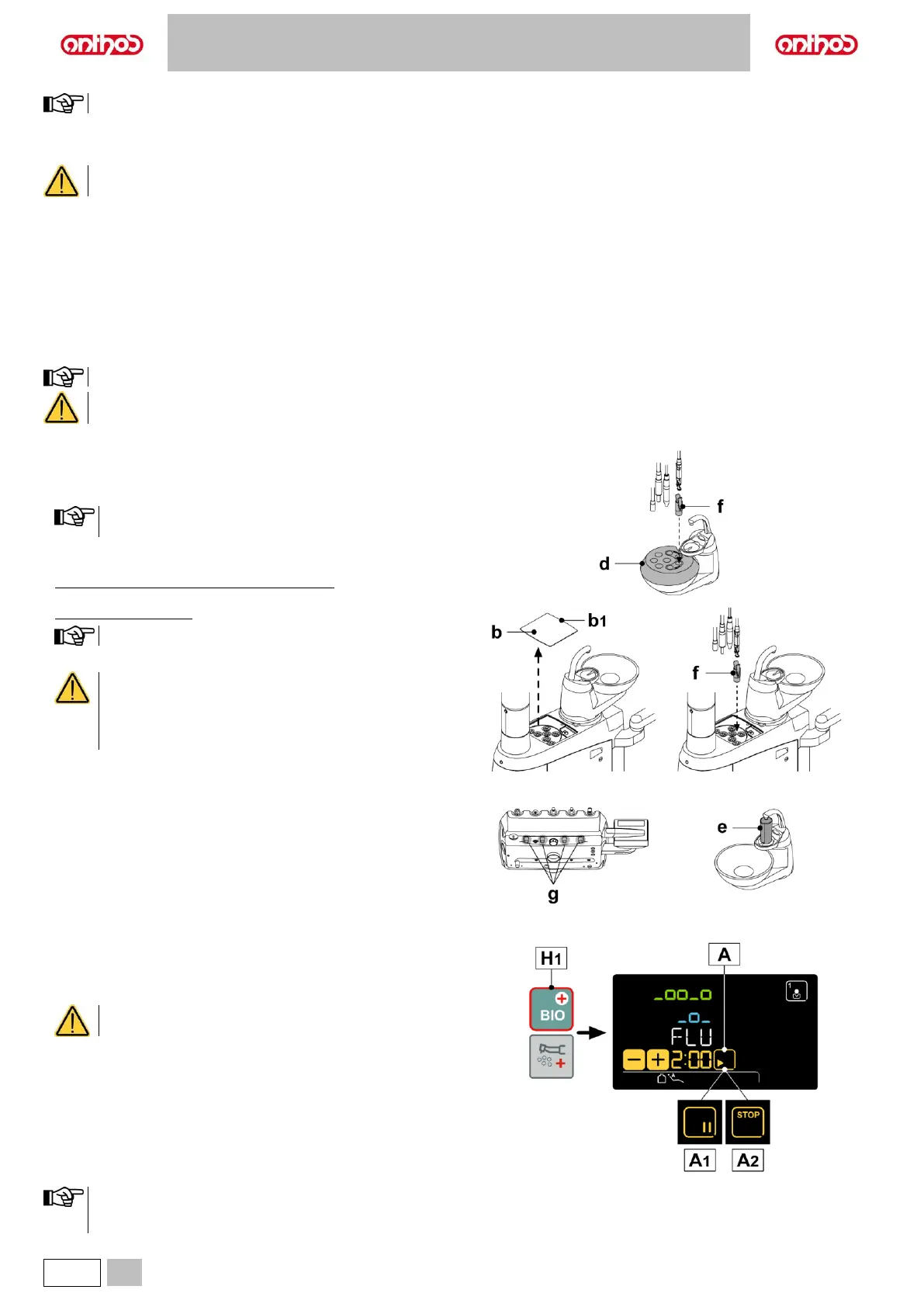
• Dental units of A3 PLUS, A5 and A6 PLUS model: position the special
container (d) on the bowl.
Dental units of L6 model: remove the cover (b).
Press the edge (b1) of the cover to lift it.
• Insert the hoses of the instruments to be treated in the suitable seats.
For the syringe instrument, it is necessary to remove the
handle and completely insert the dedicated adapter (f)
(second click). The heating system must be switched off.
Turbine and scaler hoses must be inserted without the
handpiece.
• Insert the special supplied container (e) under the cup spout.
• Make sure that spray cocks (g), positioned on board lower side, are
fully open.
Performing the flushing cycle.
• Start the flushing cycle by touching the icon button (A) on the LCD
TOUCH display or by pressing the button (H1) on the assistant's
board.
Make sure that liquid actually comes out of the
instruments during the automatic cycle.
• At the end of the flushing cycle, put the instruments extracted back into
place to return to the working condition.
Flushing cycle interruption.
• Touch “PAUSE” button (A1) to interrupt the flushing cycle at any time.
• Touch the “STOP” button (A2) within 5 seconds to stop the flushing
cycle in progress and cancel it definitively.
• After 5 seconds, touch “PAUSE” button (A1) to resume flushing cycle
from where it was interrupted.
DIGIT console only: once the flushing cycle has started, it can
no longer
be interrupted.



 To Next Page