A3 PLUS - A5 - A6 PLUS - L6
SURGICAL SINGLE CART
Coupling the handpieces and changing the drill.
Refer to the specific instructions provided with the micromotor and
various handpieces.
Use.
The instrument is supplied NON-sterile.
Carefully read the operating instructions supplied with the
instrument before attempting to sterilize.
Operating times: work 5 min., rest 5 min.
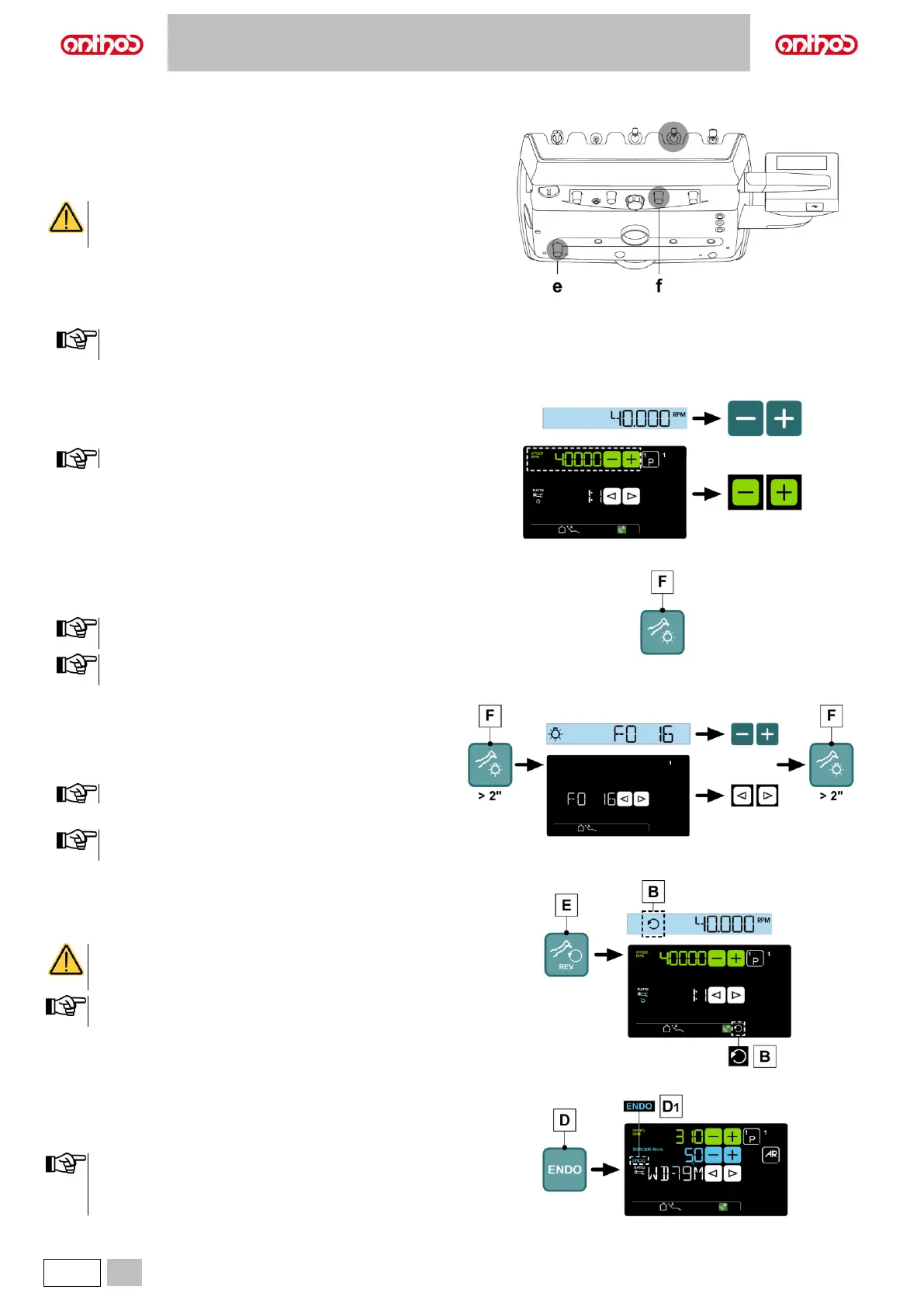
e Cock that adjusts the amount of air spray for all the instruments.
f Cock that adjusts the amount of spray water.
• Place the instrument in its work position.
Instrument activation is highlighted by the relevant managing
screen appearing on the DISPLAY.
• Use the foot control lever to start the instrument (see paragraph 5.2).
Adjusting the drill’s rotation speed.
• Set the percentage of drill’s maximum rotation speed by pressing
“increase” or “decrease” buttons.
The data set are automatically saved.
Turning on the fibre optics.
• Place the instrument in its work position.
• Press the button to turn Fibre Optics on/off (F).
The Fibre Optics switch off when the instrument is not used
for 30 seconds (rheostat lever disabled).
Micromotors with FLUO LED: the button (F) operation is
cyclical: LED OFF > WHITE LED > FLUO LED > LED OFF.
Fibre optic brightness adjustment.
• Place the instrument in its work position.
• To adjust fibre optic brightness, press the button (F) (for at least 2
seconds).
• Adjust beam brightness by pressing “increase” or “decrease“ buttons.
Value setting range: 1 to 16.
• To confirm set brightness, press the button (F) (for at least 2 seconds).
Micromotors with FLUO LED: brightness adjustment is
referred to the type of LED on at the moment.
Reversing micromotor drill rotation direction.
• Select micromotor drill rotation direction by pressing button (E):
The reversed rotation direction is signalled by a sound (3 BEEPS) and
by icon (B) appearance on the DISPLAY.
As soon as the micromotor is extracted, in addition to the
icon (B), a sound (3 BEEPS) warns the operator if the
direction of rotation is reversed.
When the rheostat lever is on, the micromotor drill cannot
reverse its direction of rotation.
Selecting the operating modes (LCD TOUCH console only).
If supported by the micromotor, select RESTORATIVE (see paragraph
5.5.1.) or ENDODONTIC (see paragraph 5.5.2.) operating modes using
button (D).
• The activation of ENDODONTIC mode is signalled on the
display through icon (D1).
• Machines equipped with a basic motor only provide the
RESTORATIVE operating mode.



 To Next Page