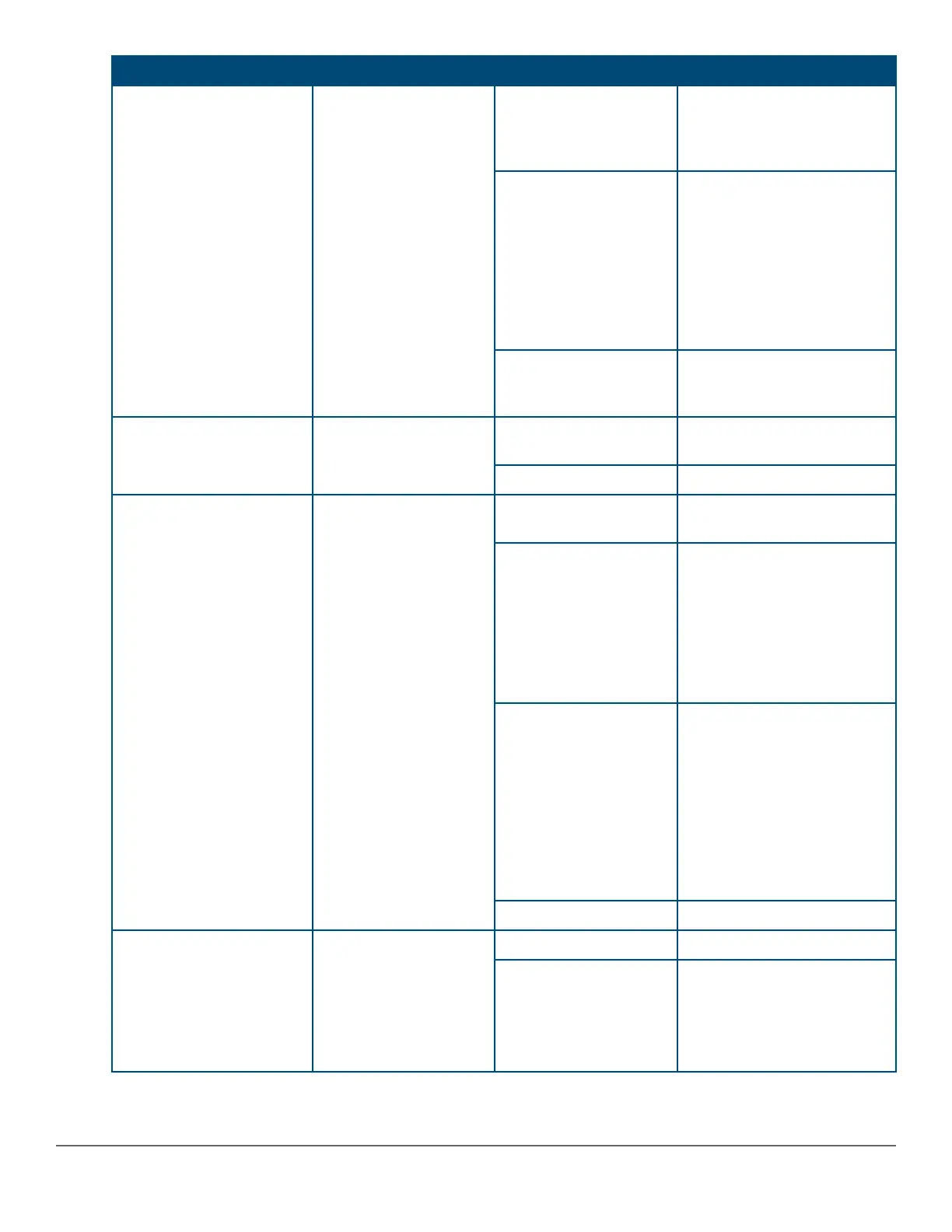
Switch LEDs Function State Meaning
Back Module Status Status of modular
components installed in
the back of the unit.
On Green Normal operation: All modular
components installed in the
back of the unit are
functioning correctly.
Slow Flash Orange* One of the modules inserted
from the back of the chassis
(power supply or stacking
module) has failed self-test or
is experiencing a fault
condition. Flashes
simultaneously with the
Global Status LED flashing
orange.
Off No modular components
installed in the back of the
chassis.
Speed Mode Selected Indicates when the Port
LEDs are showing port
speed information.
On Speed Mode is selected. Port
LEDs indicate port speed.
Off Speed mode not selected.
Power over Ethernet (PoE)
Mode Selected***
Indicates when the Port
LEDs are showing PoE
status information.
On Green PoE Mode is selected. Port
LEDs show PoE information.
On Orange PoE Mode is selected and a
port also has a PoE error. The
Global Status LED and the
LED corresponding to the port
with the error will be flashing
orange. The rest of the Port
LEDs will display normal PoE
status.
Slow Flash Orange* PoE Mode has NOT been
selected and a port has a
PoE error. LED will be
flashing orange
simultaneously with the
Global Status LED and the
LED corresponding to the port
with the error. The rest of the
Port LEDs will display normal
PoE status.
Off PoE mode is not selected.
User Mode Selected When stacking is
enabled, the Port LEDs
are displaying stack
information and status.
When stacking is
disabled, this mode is
reserved for future use.
On Green User Mode is selected.
Off User mode not selected.
Table Continued
16 Aruba 2930M Switches












 To Next Page