5. Unit description
page 17 / 96 Issue date 18.05.2021, rev. 1.0
Front panel
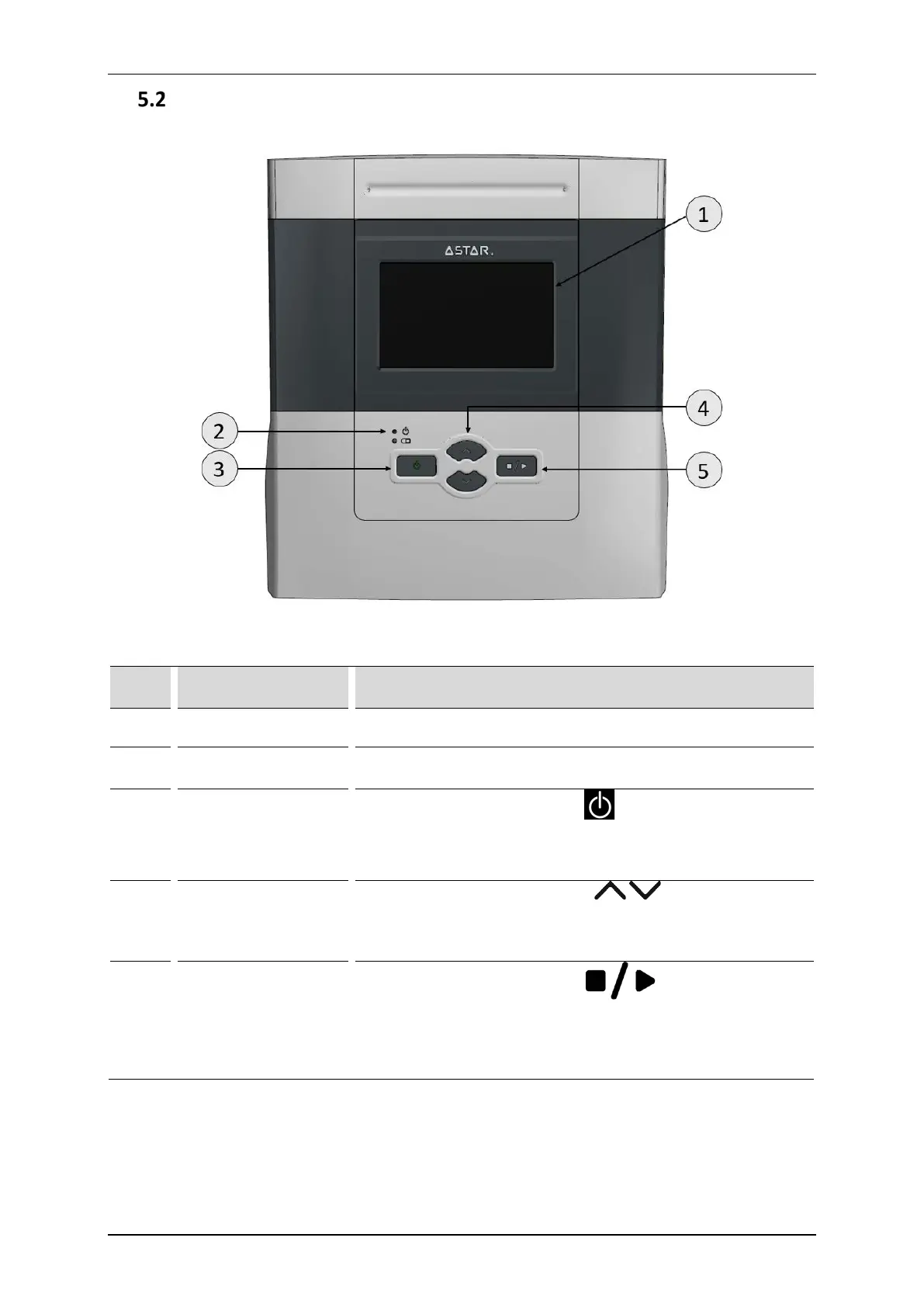
Arrangement of front panel components is shown in Figure 5.3.
Figure 5.3 Arrangement of front panel components
Table 5.1 Description of front panel components
Symbol Description Function
1. Liquid crystal display
The unit is equipped with a touch-sensitive display. The screen clearly
displays all information related to the device operation.
2.
Operation status and
battery level indicators
3.
Turn ON/OFF key
(STANDBY)
This key is marked with the symbol .
In order to activate the unit in the case of battery operation, please
hold on for at least 5 seconds. Extension of the holding time prevents
unintentional activation during transport.
4. Edit keys
These keys are marked with symbols .
Pressing any of them results in change of value of edited parameter or
setting in setup mode.
Keep holding the key down to change a parameter quicker.
5. START/STOP key
This key is marked with the symbol
.
It is used with the sequence of starting emission. Its pressing, after
setting of treatment procedure parameters starts emission.
Pressing of this key once again stops the treatment procedure. The
emission of signal is stopped.



 To Next Page