USE AND MAINTENANCE MANUAL
ATTILA
29
EN
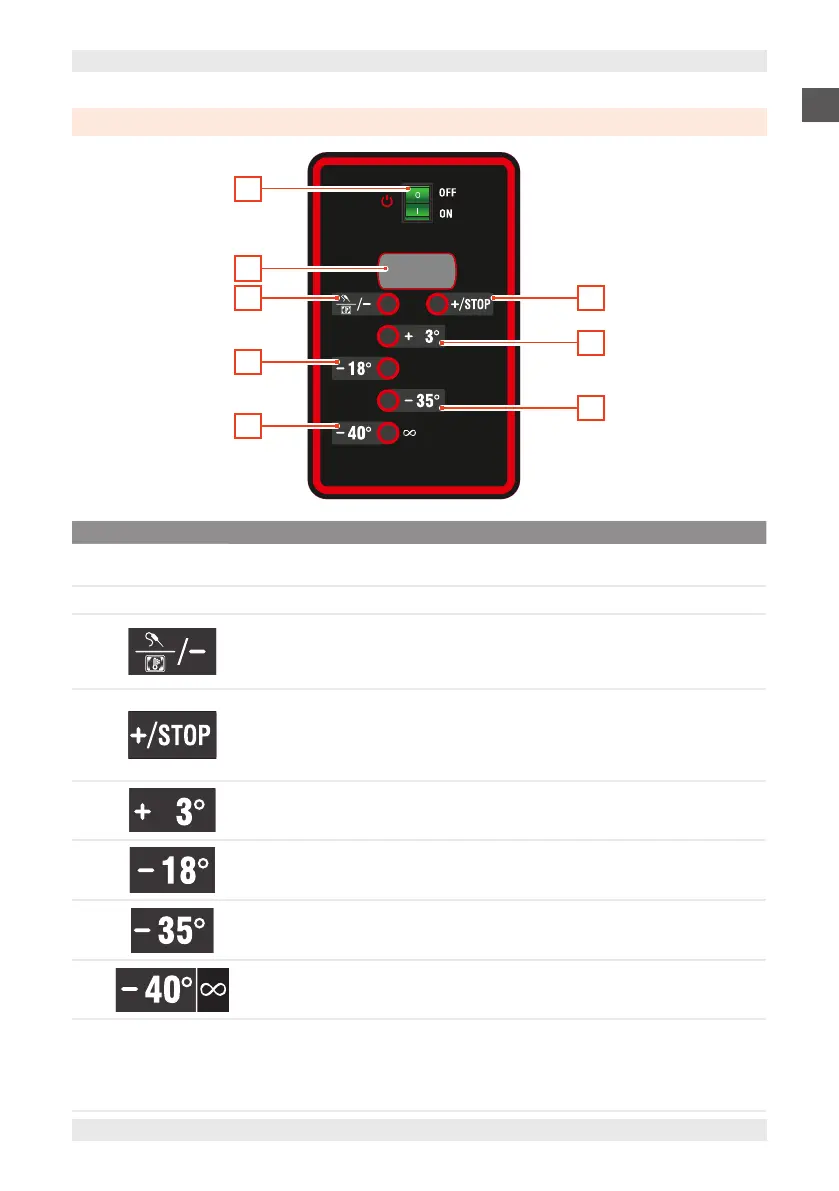
7.3. 'ALADINO' VERSION BLAST CHILLER INTERFACE
3
2
6
8
4
5
7
1
POS. ICON ELEMENT DESCRIPTION
1
-
MAIN SWITCH 0/I
▪ Set to “0”: machine switched off
▪ Set to “I”: machine electrically powered.
2
-
DISPLAY Displays the equipment operating parameters.
3
Time adjustment - /
Chamber and core
temperature control /
Timed blasting
Press and release
Scrolls through the menu.
Decreases time or temperature of selected cycle.
4
Time adjustment + /
Chamber temperature
control /
Stop blasting cycle/
Defrost
Press and release
Scrolls through the menu.
Increases time or temperature of selected cycle.
5
Positive blasting or
cooling
Press and release
Cooling cycle selection (+3°C).
6
Negative blasting or
freezing
Press and release
Negative blasting cycle selection (-18°C).
7
Negative deep-blasting or
freezing
Press and release
Negative blasting cycle selection (-35°C).
8
Innite negative blasting
or freezing
Press and release
Infinite negative blasting cycle selection (-40°C).
- Led operation
▪ Steadily on:
Pending blasting status
Blasting status in progress
▪ Flashing:
Active conservation status


 To Next Page