USE AND MAINTENANCE MANUAL
ATTILA
45
EN
8.5.8. CELL LIGHT (IF ANY)
To switch the cell light on or off:
STEP ACTION
1
Press the button and select the cell light function (Parameter LMP).
2
Press the button to switch the cell light on or off.
Note: In the event of a power failure, the cell light is off when power is restored.
If the conditions are not met, the relevant LED will flash 3 times, indicating that the operation will not be carried out.
8.5.9. MANUAL DEFROST
Perform defrosting with door open or door closed. In the case of defrosting with the door closed, the time required will be
longer.
To perform manual defrosting:
STEP ACTION
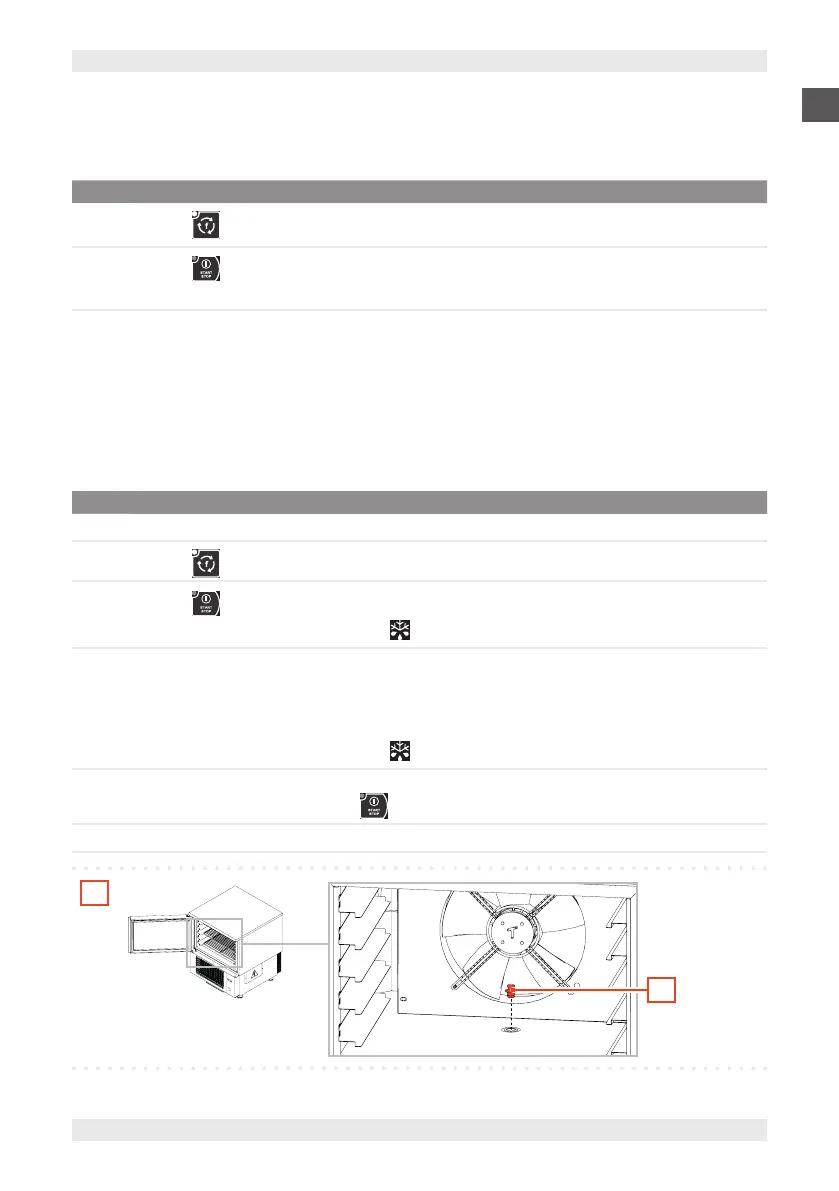
1 Remove the drain plug (A).
2
Press the button and select the defrost function (Parameter dEF).
3
Press the button to start manual defrosting.
Note: The display shows “dEF” and the LED starts flashing.
4
Defrosting starts:
▪ Immediately if a blasting phase is in progress
▪ Simultaneously with the next storage phase
▪ As soon as I start a new blasting cycle (depending on parameter dF5).
Note: The display shows “dEF” and the LED starts flashing.
5
At the end of defrosting, the device emits a sound and returns to the stop status.
Note: to end defrosting early, press the button.
6 Empty the condensate drip tray and re-insert the drain plug (A).
1
A
If the conditions are not met, the relevant LED will flash 3 times, indicating that the operation will not be carried out.


 To Next Page