ATTILA
EN
30
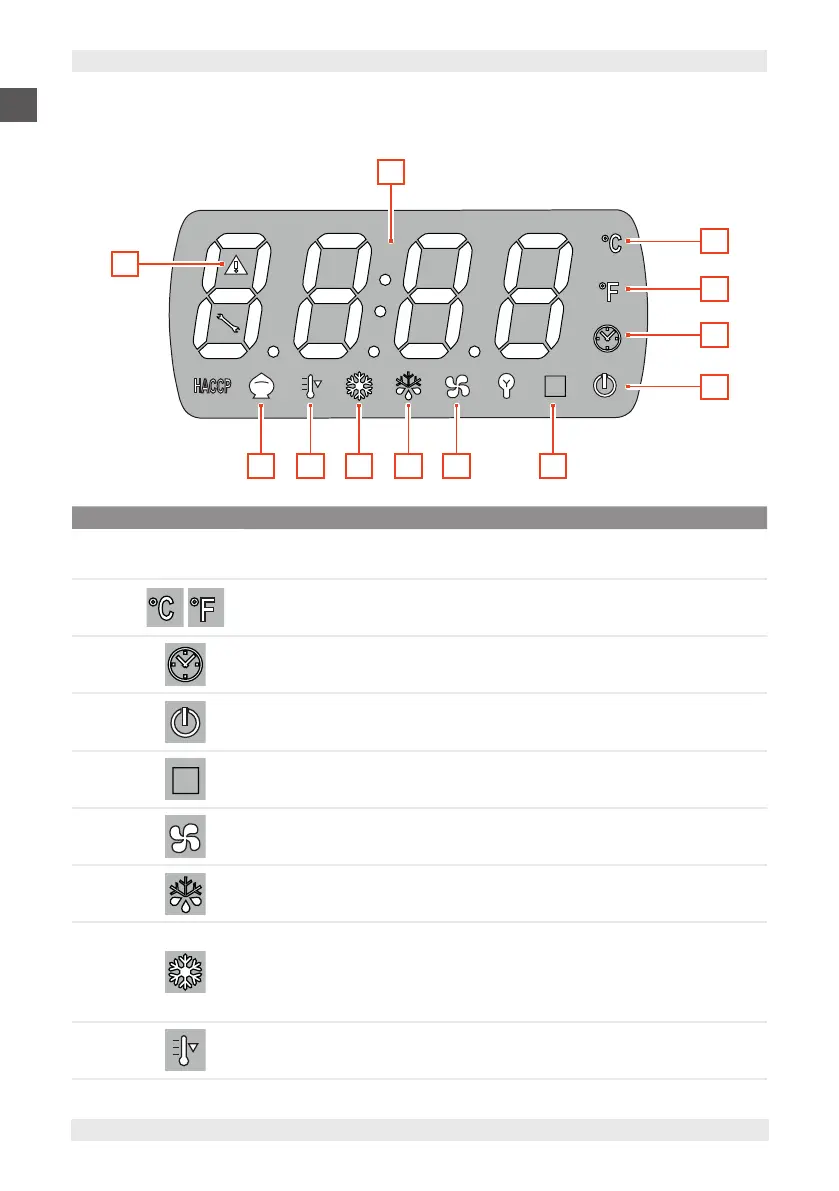
7.3.1. DISPLAY
F
678910 5
2
11
2
3
4
1
POS. ICON DESCRIPTION
1
-
Displays the equipment operating parameters.
2
Indicates that the temperature is expressed in degrees Celsius or Fahrenheit
3
Indicates the current time
4
Indicates that the equipment is powered, but in Standby
5
F
Steady light indicates that core blasting is active.
Flashing light indicates that the blast chiller has switched to timed blasting.
6
Indicates that the chamber fan is ON
7
Indicates that defrosting is active
8
Steady on
Compressor powered.
Flashing
Compressor call that is in the 'Compressor-saving' stand-by phase.
9
Indicates that the controller of the second condenser fan is active


 To Next Page