105
13 Update
This chapter describes the update operation for the MaxiTPMS tablet. The software
updates can be completed on the tablet via the Internet.
13.1 Tablet Update
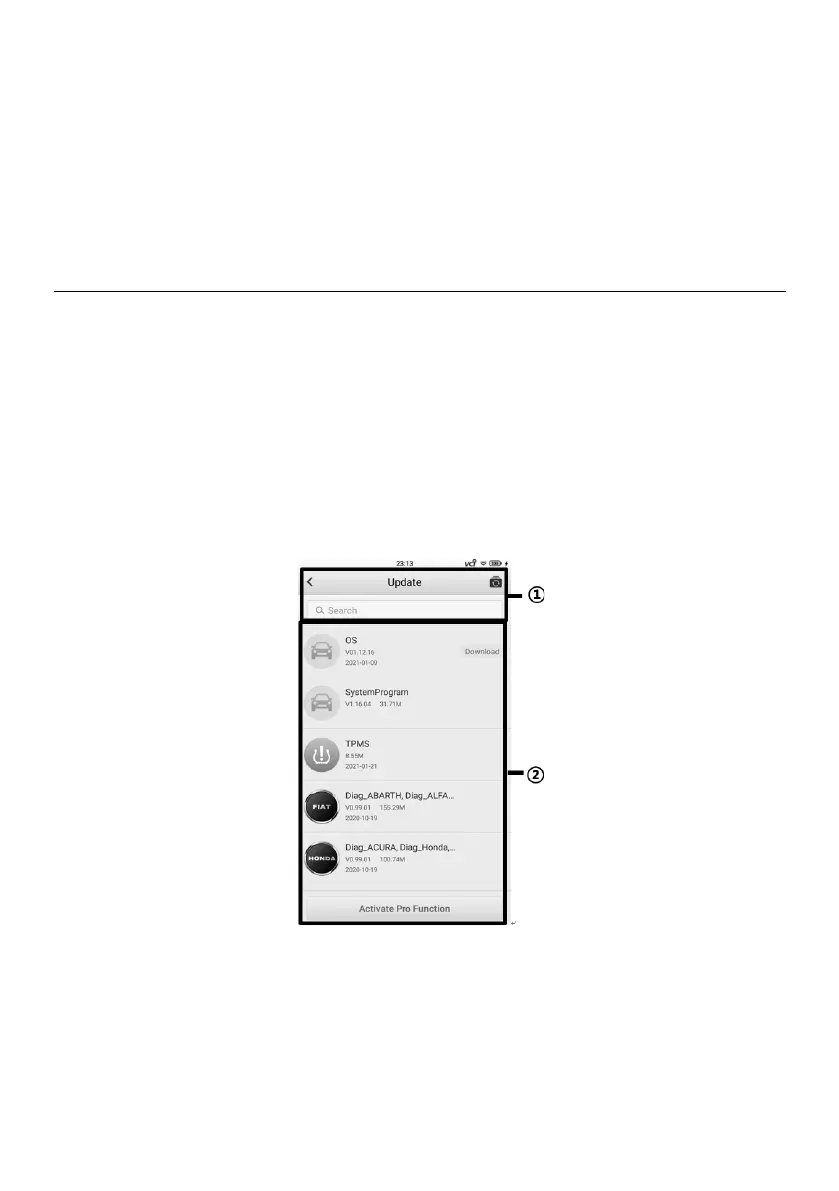
The Update application allows you to download the latest released software. The updates
can improve the MaxiTPMS applications’ capabilities, typically by adding new vehicle
models, TPMS service functions, etc.
The device automatically searches for available updates for all of the MaxiTPMS
components when it is connected to the Internet. Any updates that are found can be
downloaded and installed on the device. This section describes installing an update to
the MaxiTPMS System software. Tap the Activate Pro Function button at the bottom of
the screen for all systems diagnostics and service function with an additional in-app
purchase.
Figure 13-1 Update Screen
1. Navigation and Controls
⚫ Return Button — returns to the MaxiTPMS Job Menu.
⚫ Update All — downloads all available updates.















 To Next Page