57
3. Tap Scan at the upper-right corner of the tablet’s screen.
4. The device name may display as “Maxi” suffixed with a serial number. Select
the appropriate device for pairing.
5. When paired successfully, the connection status displays the device name with
the message “Paired.”
6. Once paired, the VCI button on the upper-right corner of the screen will display
a green check and the Connection LED on the BT506 illuminates blue. This
signifies that the tablet is connected to the BT506, and it is ready to for use.
➢ To connect to a battery
1. Press and hold the Power/Lock button to turn on the BT506 tester.
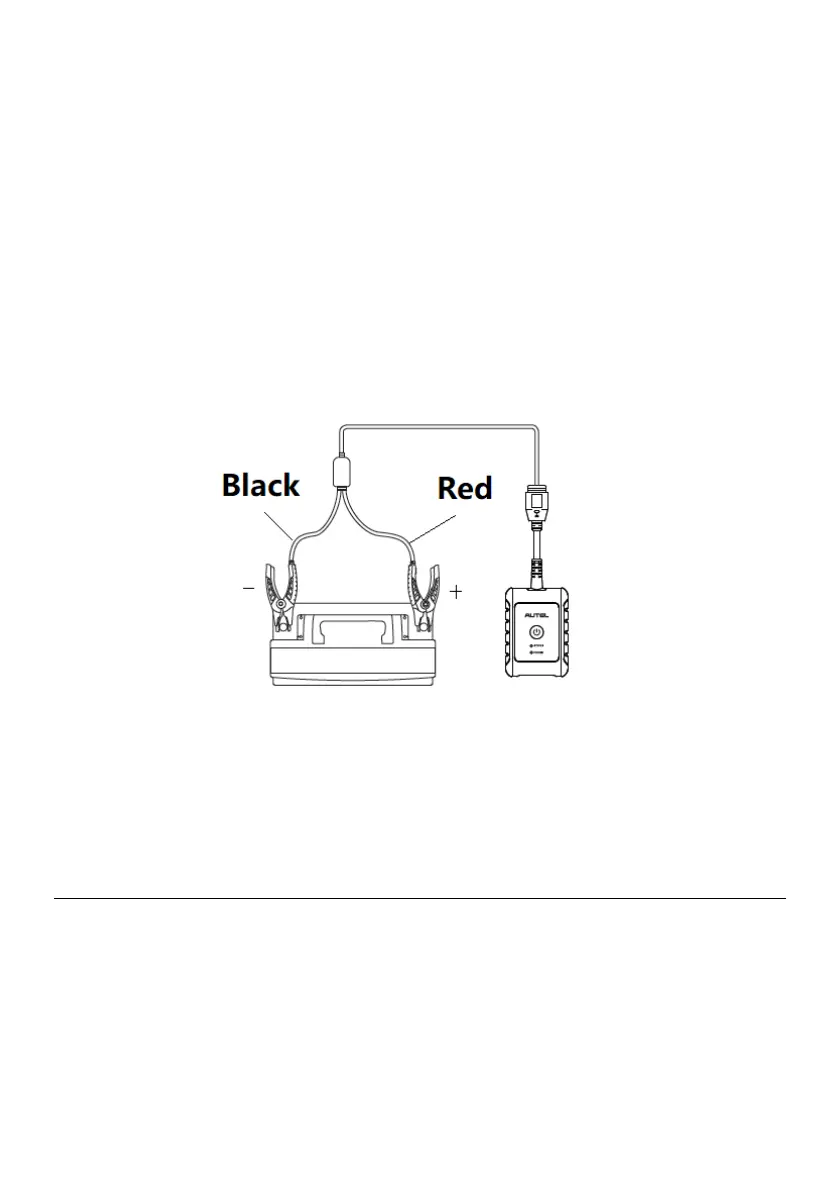
2. Connect the red clamp to the positive (+) terminal and the black clamp to the
negative (–) terminal of the battery.
Figure 6-2 Connecting to a Battery
3. The black clamp is installed with an infrared sensor near the clamp mouth that
tests the battery temperature. The battery temperature will appear on the
Battery Test Result screen or on the Battery Test Report.
6.3 In-vehicle Test
In-vehicle Test is used for testing batteries that are installed in a vehicle. An in-vehicle
test includes battery test, starter test, and generator test. These tests help determine the
health status of the battery, the starter, and the generator, respectively.















 To Next Page