Connecting a wired handset
About this task
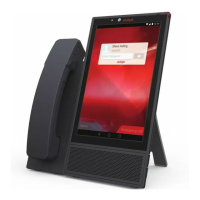
Use this procedure to connect a wired handset to your Avaya Vantage
™
.
Before you begin
Ensure that the handset cradle is connected to the Avaya Vantage
™
device.
Procedure
1. Plug the non-spiral end of the handset cord into the handset connector on the handset
cradle.
2. Plug the other end into the connector on the handset.
Connecting a wireless handset
About this task
Use this procedure to connect or pair a wireless handset with your Avaya Vantage
™
device. You
cannot use the wired handset after you connect the wireless handset. You can connect only one
wireless handset at a time.
You need administrative privilege to remove the pairing with the wireless handset.
Before you begin
• Ensure that the handset cradle is connected to your Avaya Vantage
™
device.
• Charge the handset battery by placing the handset in the cradle.
• Turn off the wireless handset.
Procedure
1. Lift the wireless handset from the cradle, and press and hold the top Power button for at
least 10 seconds to enter the pairing mode.
Connecting a handset to Avaya Vantage
™
May 2018 Installing and Administering Avaya Vantage
™
27
Comments on this document? infodev@avaya.com


 To Next Page