Page 54 of 78
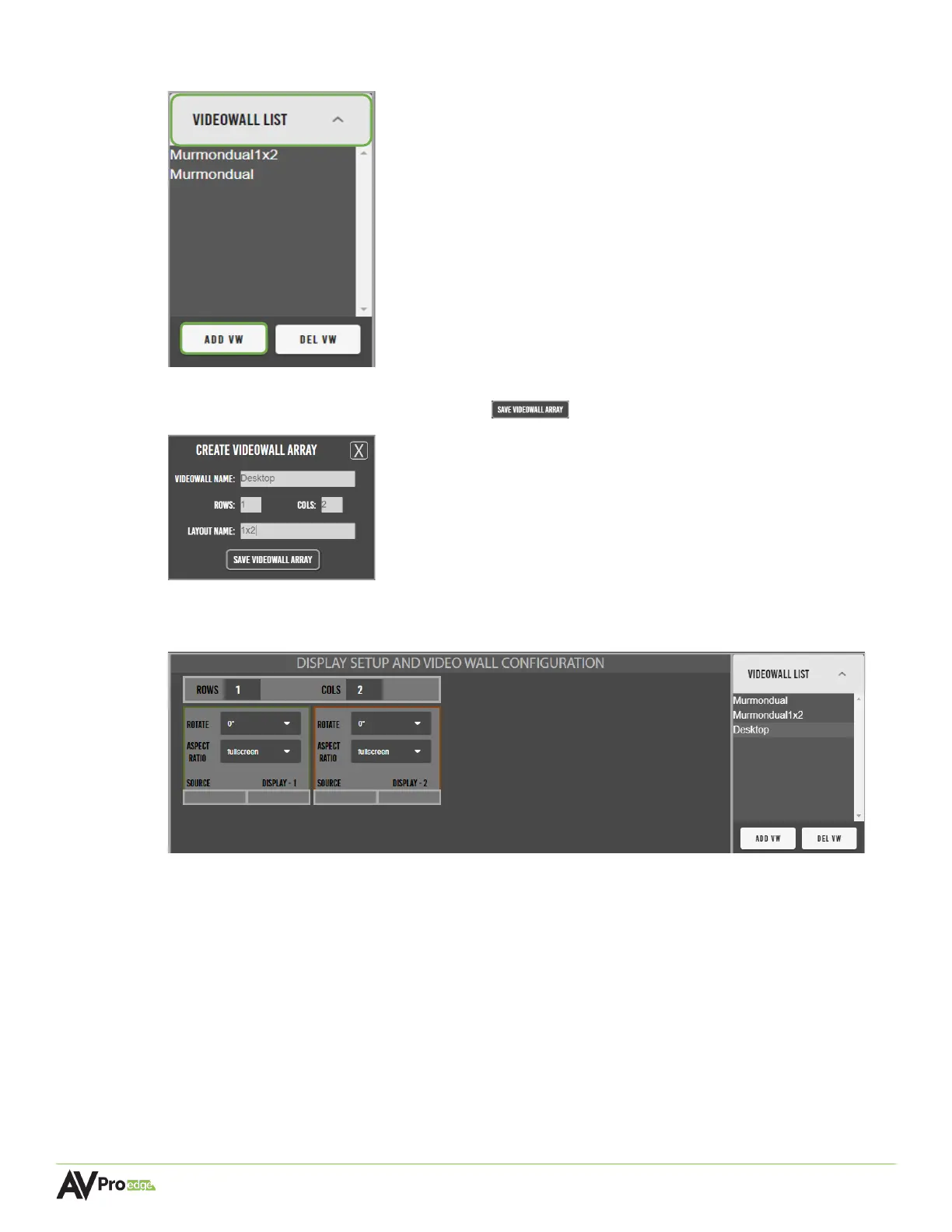
1 In the Video Wall tab, select the videowall list dropdown menu, and select add vw.
2 Enter in the video wall name, number of rows and columns, and the layout name. Then
select the save video wall array button .
3 Mentor will then generate the “panels” of the video wall layout, with the previously saved
array now appearing under the VideoWall List.
The panels are laid out similarly to how the actual video wall will be viewed in person. Each
panel includes a separate dropdown menu for image rotation and aspect ratio, along with
the custom names of the selected inputs and outputs, and the display number.
ROTATE Dropdown menu, options are 0°, 180°, or 270°.
ASPECT RATIO Dropdown menu, options are fullscreen (4:3) or keep aspect ratio
(16:9).
SOURCE Shows the current active source on the selected display.
DISPLAY - # Shows the number of the display relative to its position within the
video wall layout. Numbered in ascending numerical order, left-to-
right and top-to-bottom.



 To Next Page