SURFACE | TALKBOX CONNECTIONS
3. SURFACE
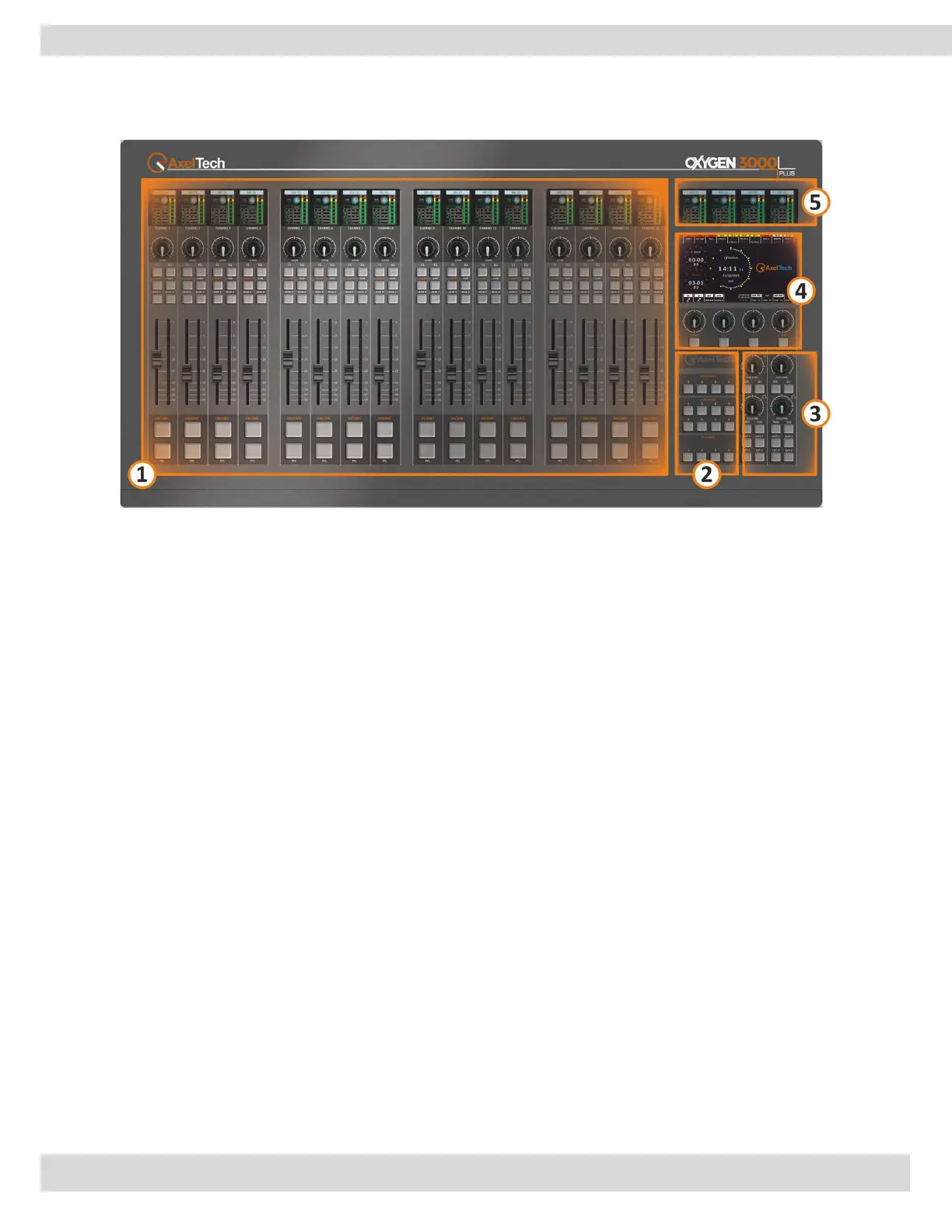
1. CHANNEL CONTROLS
The console offers 16 physical channel strips and an additional 8 virtual channels, affording complete
control over the primary parameters of the channel. It features an integrated LCD screen for configuring
the channel and adjusting the pre-fader audio levels. [MORE INFO ]
2. SPECIAL FUNCTION BUTTONS
The function keys are used to perform specific tasks. They are labeled as SNAPSHOTS, FUNCTIONS, and
TALK BACK. [MORE INFO ]
3. MONITORS SECTION
It allows you to manage the main outputs (PGM, SUB, AUX, ..etc), monitor signals, and control the
loudspeakers and headphones of the CONTROL ROOM and the STUDIO speakers.
The knob controls the audio level that is monitored using headphones and loudspeakers. Here you can
select the sources that will be continuously monitored, and choose individual channels for monitoring by
using the PFL feature. [MORE INFO ]
4. MENU CONTROL BUTTONS & DISPLAY 7" TFT
The 4 knobs allow you to adjust and confirm the menu parameters. The menu parameters are accessed
and controlled through a digital interface that is displayed on the DISPLAY or HDMI out.
DISPLAY 7" TFT shows different useful elements and information depending on the location in the menu.
Used also to navigate through the different menus and lists available in the menu interface. [MORE INFO ]
5. OUTPUTS DISPLAY
The LCD display is used to display the status and the stereo audio level of different buses, such as PGM
(program), AUX (auxiliary), and SUB (subgroup). Also used to display the status of other monitors, such
as PFL (Pre-Fader Listen) and other monitoring options. [MORE INFO ]



 To Next Page