34
SURFACE | CHANNEL CONTROLS
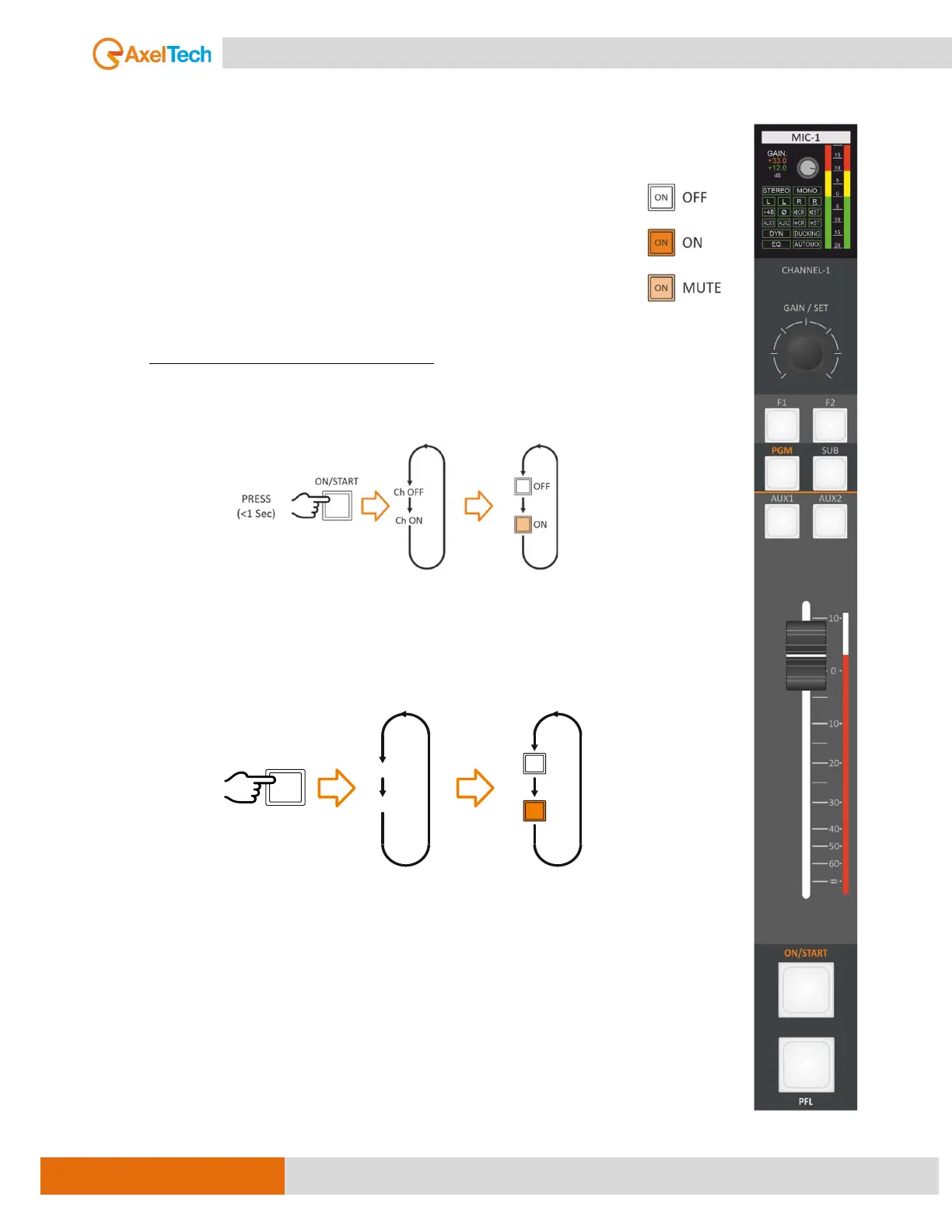
3.1.7. ON/START
This button to enable/disable the channel (ON/OFF), the OFF status mutes the channel
automatically, and the RGB LEDs under the buttons have three different statuses:
1) LED OFF - OFF status - the channel is MUTE.
2) LED ON in (warm color) - ON status – the channel is OPEN.
3) LED ON in (light color) – standby status.
Differently, from the EQ and the GAIN, the ON/OFF status is not associated with the
source, it’s associated with the physical channel.
The ON/OFF channel status could be changed by:
pressing at ON/START button as shown below.
3.1.8. PFL
This button enables/disables the Pre-Fader Listen of the channel. When the button’s
LED is ON, the PFL is enabled on that channel.
PFL, its effect appears on any of the monitors (headphones and loudspeakers) if that
monitor mode is +PFL. like (SEL+PFL, 1SEL+PFL or 2SEL+PFL).
For example:
To activate PFL in Control Room speakers (SPK-CRM), follow up this path to change the
mode to +PFL.
MENU / AUDIO / OUTPUTS / MONITOR / SPK-CRM / MODE
(1SEL+PFL, 2SEL+PFL) [MORE INFO ]
PRESS
PFL OFF
PFL
PFL
SET
PFL ON
PFL



 To Next Page