42
SURFACE | OUTPUTS DISPLAY
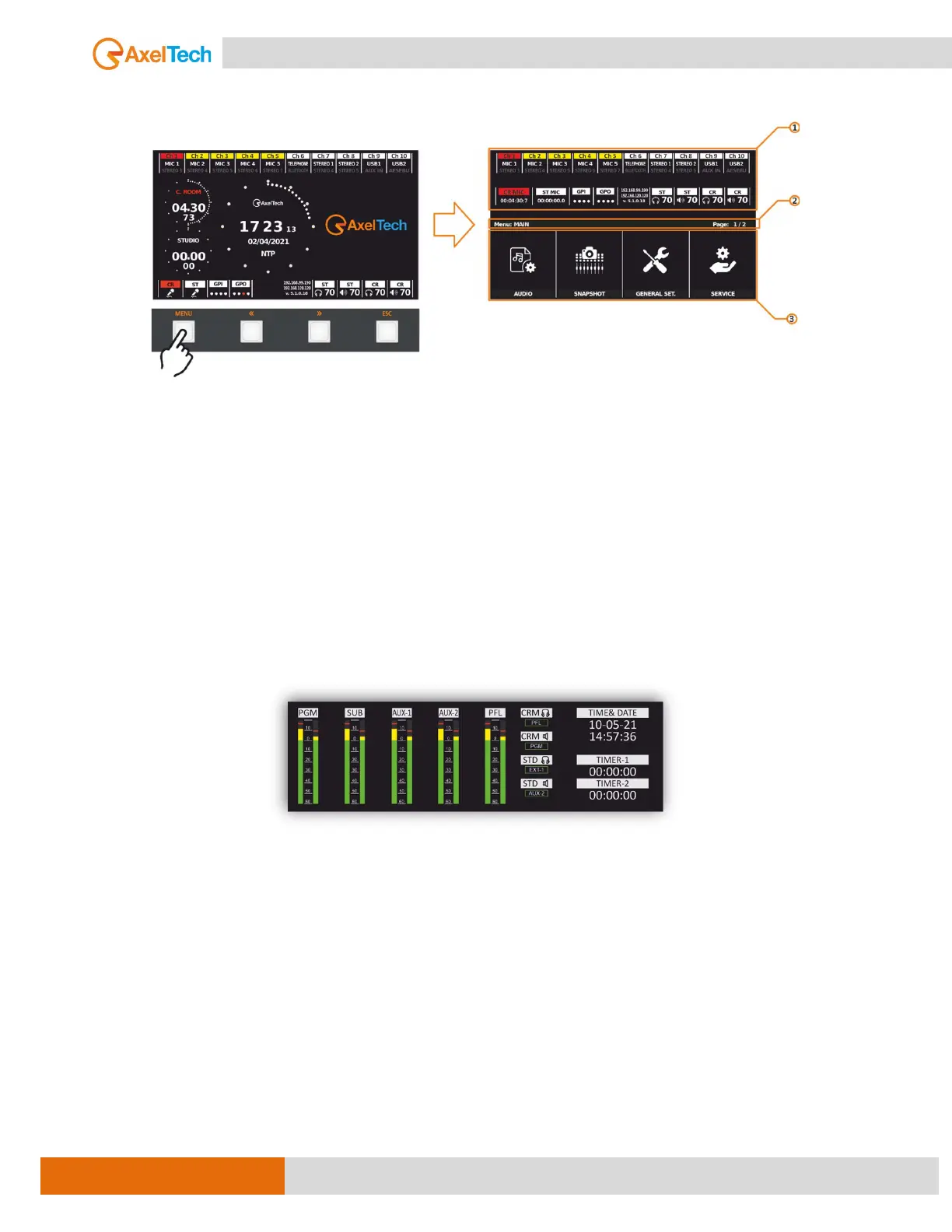
D. MENU display parts
1. In this part of the display can see some useful elements and information depending on
the location of the MENU.
2. From here you can browse all lists available in the menu.
3. To navigate the root of your page. The page number indicates the pages available and
the current page.
3.5. OUTPUTS DISPLAY
A built-in LCD audio level bar graph meter.
The LCD audio level bar graph meter would display the audio level for each of the mixer outputs, including
PGM, SUB, AUX1, AUX2, and PFL. This would allow the operator to easily monitor the level of each output
and make adjustments as needed to ensure that the audio is properly balanced and not distorted.
It also contains the status of audio monitoring devices, such as loudspeakers and headphones. This would
allow the operator to control the volume of the monitors and audio routing.
In addition, on the far right side are displayed some details about the date, time, and 2 TIMERS. This
information could be useful for keeping track of recording sessions or live events and ensuring that
everything is running on schedule.



 To Next Page