66
MENU | AUDIO
GAIN
This cursor adjusts the output GAIN of the current DANTE output.
The parameter has a 0.1 dB step for a minimum of -6.0 dB to a maximum of +6.0 dB.
The default value is 0.0 dB.
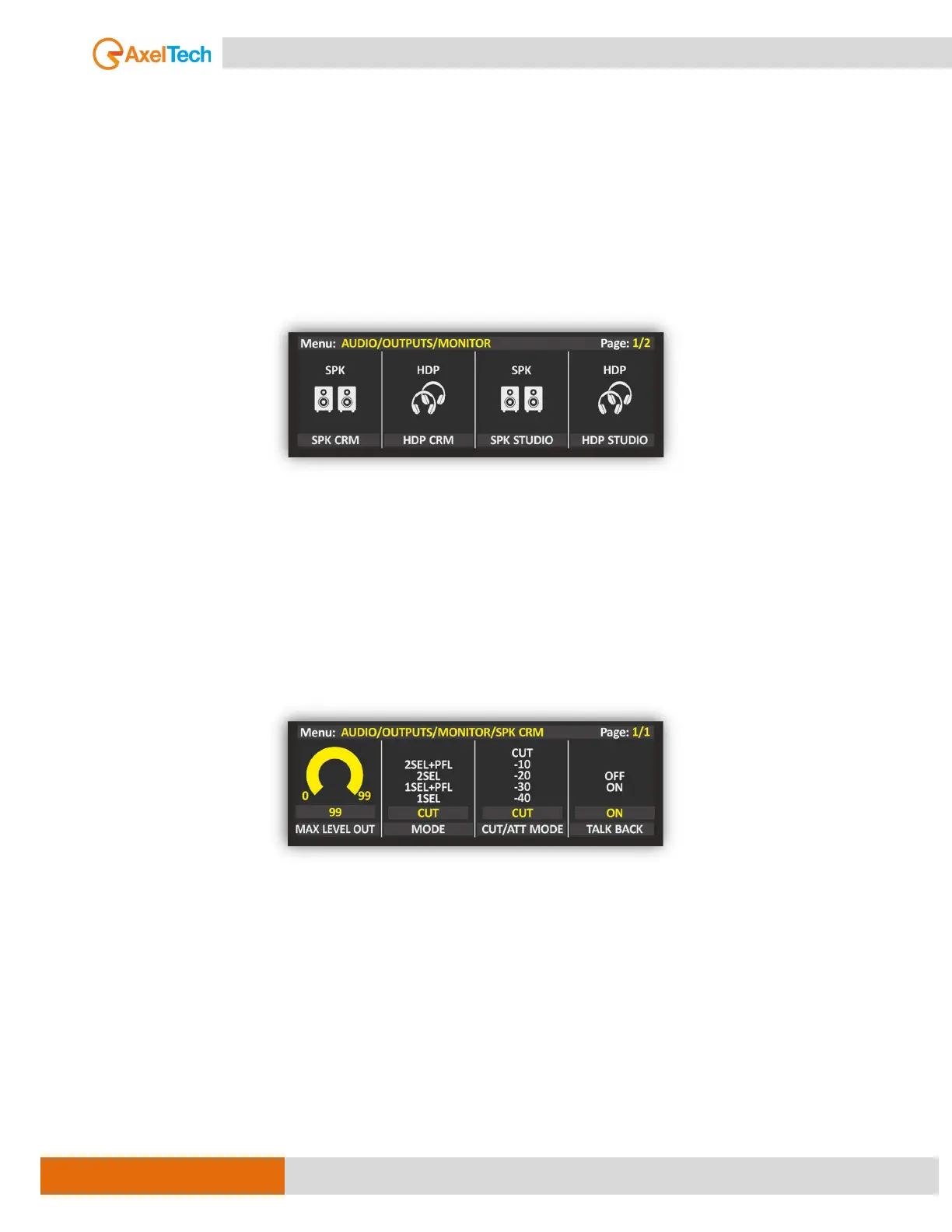
MONITOR (SPK & HDP)
From this level of MENU, you can customize the main outputs. In this section, you can select the main
output source type, gain, and mode.
It’s also able to adjust the audio output level with the GAIN knob. The gain has steps of 0.1 dB. The audio
output GAIN range goes from -6 dB to 6 dB. From MODE can select the output type like STEREO, MONO,
MONO LEFT, or MONO RIGHT.
N.B.: When the parameter control is activated, in real-time the parameter value is updated, perceiving
the increase and decrease of the GAIN, the graphics will change from yellow to white until the
parameter is confirmed.
SETUP / AUDIO / OUTPUTS / MONITOR [MORE INFO ]
MAX LEV OUT
It is possible to limit the maximum audio level of the current Loudspeaker or Headphones output in the
case current loudness is too high for the needs. By adjusting this cursor you will be able to reduce the
allowed MAX LEV OUT. The parameter has a 1 % step.
for a minimum of 0 % to a maximum of 99 %. The default value is 99 %.
MODE
[MORE INFO ]
CUT/ATT MODE
[MORE INFO ]



 To Next Page