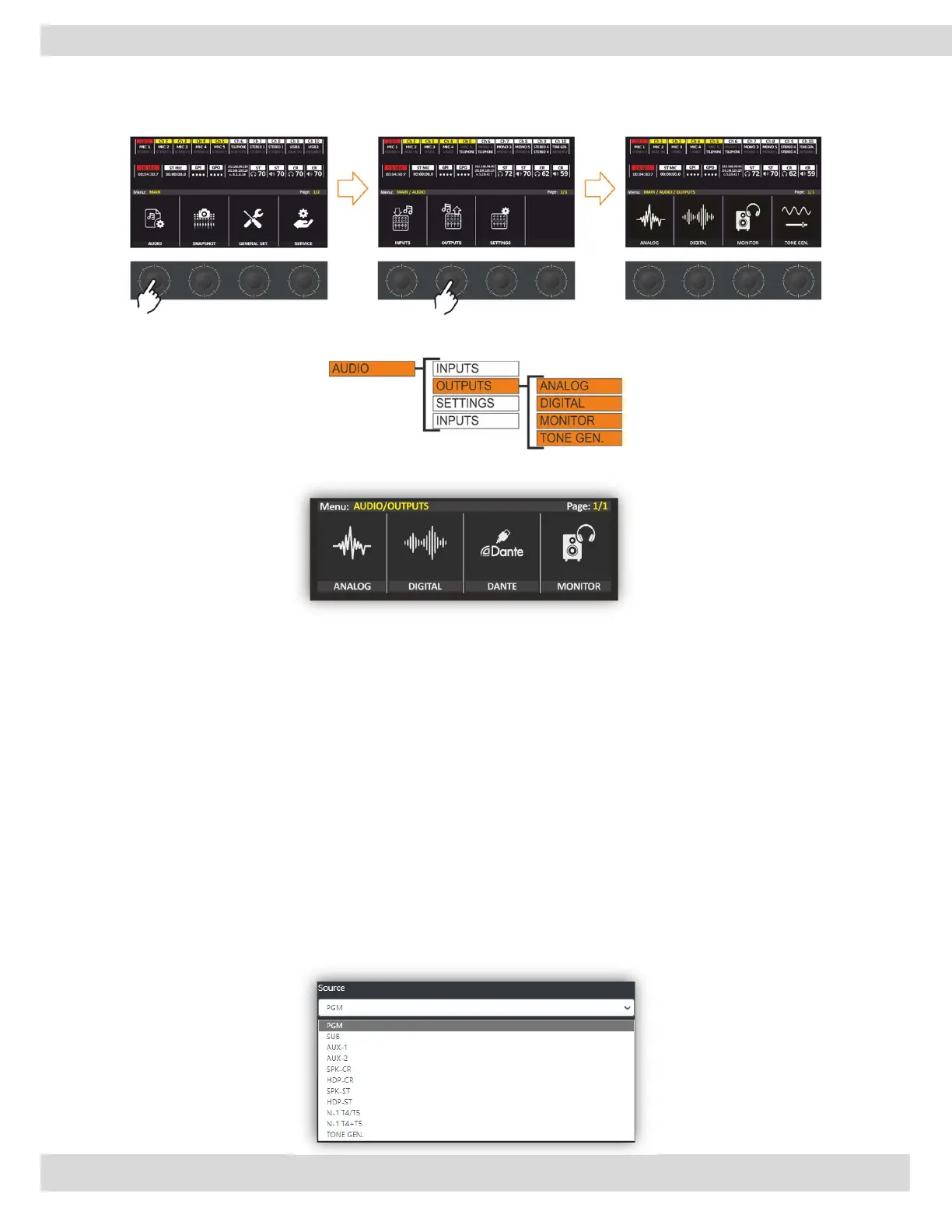
MENU | AUDIO
You can set output parameters from the MENU: MAIN / AUDIO / OUTPUTS by PUSH/RUTATE the
knobs as in the following steps.
From this level of the menu, you choose which output you like to customize.
ANALOG & DIGITAL outputs.
From this level of MENU, you can customize the main outputs. In this section, you can select the main output
source type, gain, and mode.
It’s also able to adjust the audio output level with the GAIN knob. The gain has steps of 0.1 dB. The audio
output GAIN range goes from -6 dB to 6 dB. From MODE can select the output type like STEREO, MONO,
MONO LEFT, or MONO RIGHT.
N.B.: When the parameter control is activated, in real-time the parameter value is updated, perceiving the
increase and decrease of the GAIN, the graphics will change from yellow to white until the parameter is
confirmed.
DANTE OUT
The source of these DANTE outputs is selectable by the user by choosing a different logical BUS between
PGM/SUB/AUX-1/AUX-2 or by selecting one of the monitoring signals SPK-CR/HDP-CR/SPK-STD/HDP-STD,
or by using it as a cleanfield/n-1 channel for the additional TELCO devices. The TONE GEN. has only test
purposes for the audio output.



 To Next Page