SURFACE | CHANNEL CONTROLS
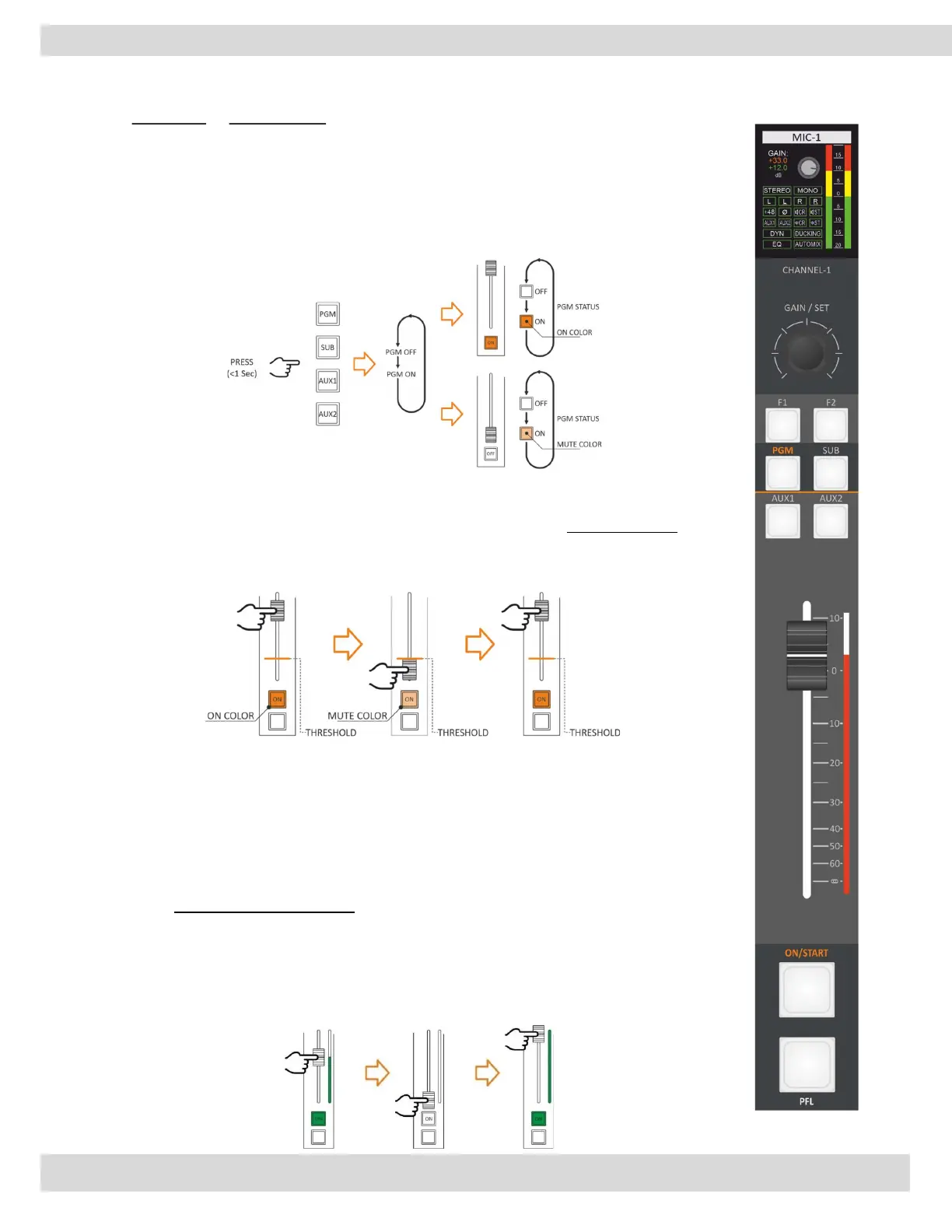
When a channel switches from ON to OFF or standby status, the related LEDs switch
from ON Colour to standby color. this function allows us to understand the channel and
BUS's status.
ON/OFF channel status could depend on:
ON/START button.
Fader position.
3.1.5. FADER
A command is generated every time the Fader passes through the threshold value:
ON - crossing the threshold point from bottom to top.
OFF - crossing the threshold point from top to bottom.
Differently, from the EQ and the GAIN, the FADER status is not associated with the
source, it is associated with the physical channel. Changing the source, the FADER
attenuation and the FADER position will not change.
ATTENTION:
It is possible to set AUX-1 and AUX-2 to be POST-Fader or PRE-Fader.
The FADER does not affect the signal in the PRE-FADER case.
3.1.6. FADER LED BAR
The FADER LEDs BAR shows the channel level. It indicates the attenuation level and the
source type by setting different colors for each type of audio source.



 To Next Page