40
SURFACE | MENU CONTROL
3.4. MENU CONTROL
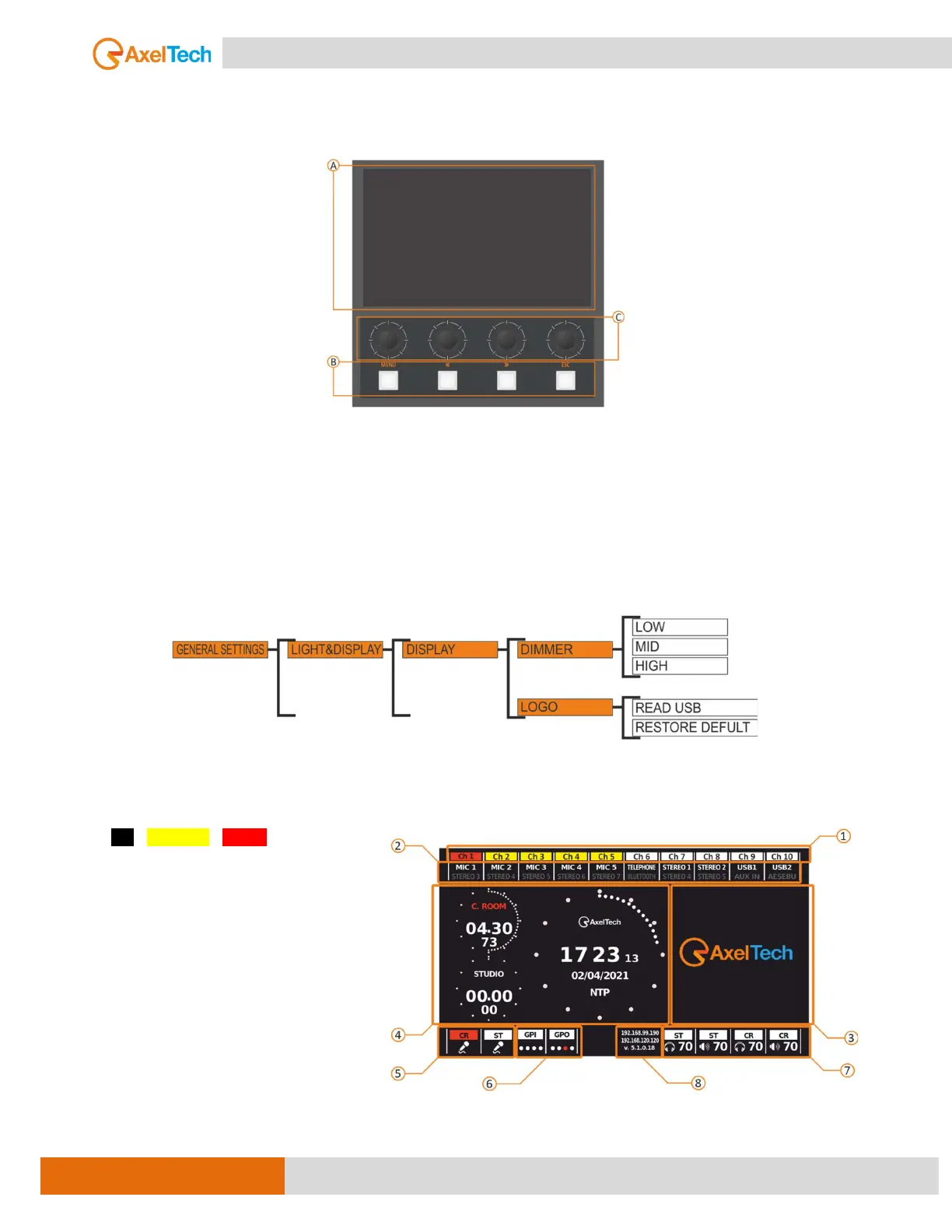
BUTTONS & DISPLAY 7" TFT
A. COLOR DISPLAY 7’’ - 800X480 RESOLUTION
The display is used to control the mixer setting and monitor all the parameters and it has its own
configuration menu. The display has some parameters that can be changed like DIMMER and LOGO. It is
possible to adjust the display brightness, allowing you to deal with any environmental situation. You can find
the parameter in the following menu: GENERAL SETTINGS/LIGHT & DISPLAY/DISPLAY/DIMMER (low, mid,
high). It is possible to have the logo of your own station on the Mixer display. The image must be 330x280px
in PNG format.
The HOME THEME parameter defines what to see on the display in standard conditions when no
function has been recalled.
The following picture is the HOME PAGE:
1. OFF / STAND-BY / ON-AIR channel STATUS.
2. Source names associated with channels.
3. Logo display.
4. NTP synchronized clock & Mic timer.
5. ONAIR mic status.
6. GPIO 1&2 status.
7. Speakers and Headphones status.
8. Firmware release and IP address.



 To Next Page