SURFACE | MENU CONTROL
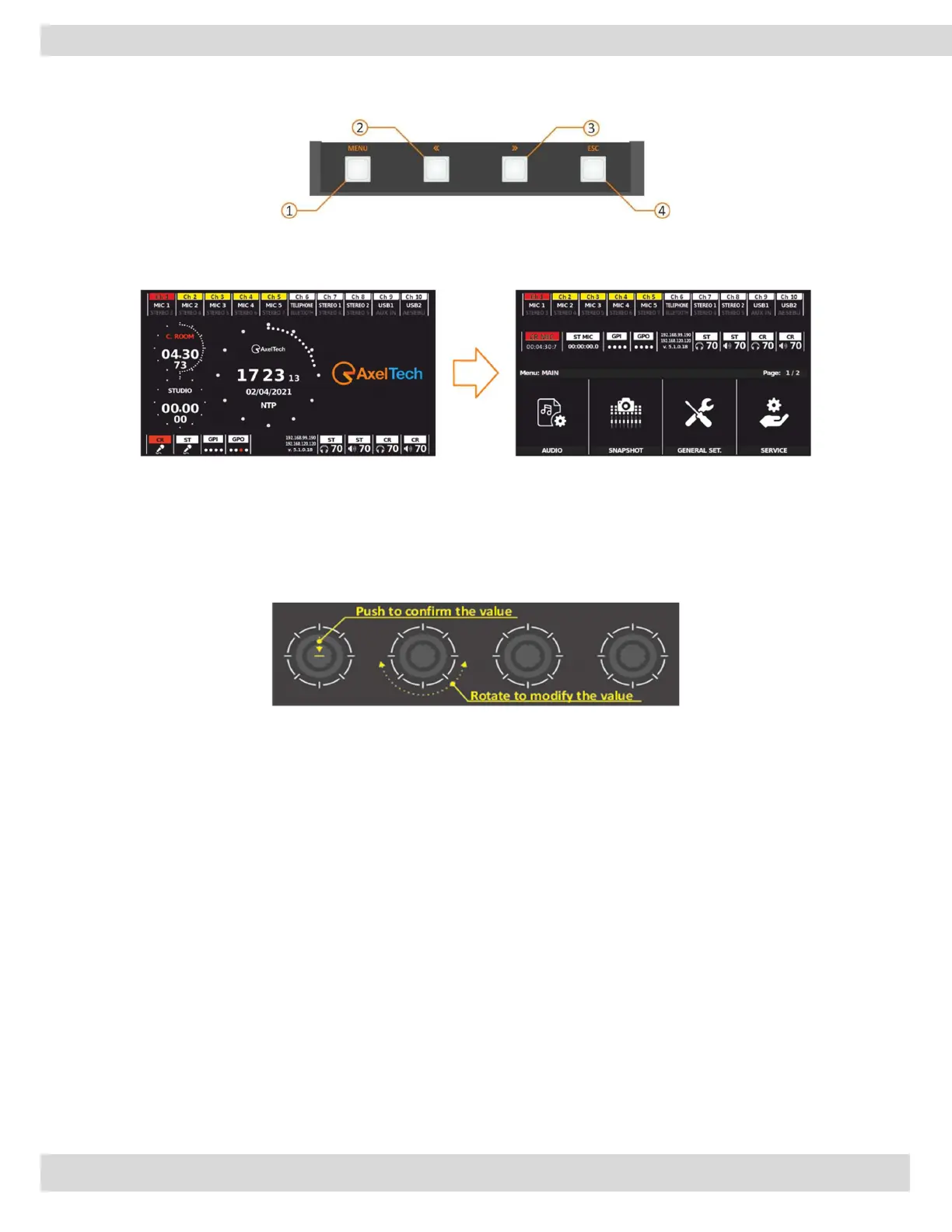
B. BUTTONS FOR THE MENU NAVIGATION
1) The MENU button switches from HOME to MENU. With this button, you can recall the mixer
configuration menu.
Buttons 2 and 3 (>> and <<) allow you to move between pages of parameters/functions on the same
menu level. ESC (button 4) allows you to exit from the menu level going up in the menu.
C. ENCODER FOR THE MENU NAVIGATION
The 4 knobs allow you to adjust and confirm the menu parameters.
It is also possible to PUSH the knob to confirm the parameter setting.
Menus are designed to have a perfect match between graphics and knobs.
Parameter changes will be directly applied to the audio of the aired channel.
The yellow value represents the stored value.
While a knob is being moved the circle becomes white. A white value appears in the middle of the
circle. The new value represents an instantaneous value that is different from the stored one.
Push the related knob to confirm the parameter changes. Once you have confirmed the new value,
the graphic will become yellow again.
At the ESC press or at the next screen change if the changes will not be confirmed, the value will be
restored to the one previously saved.



 To Next Page