1234
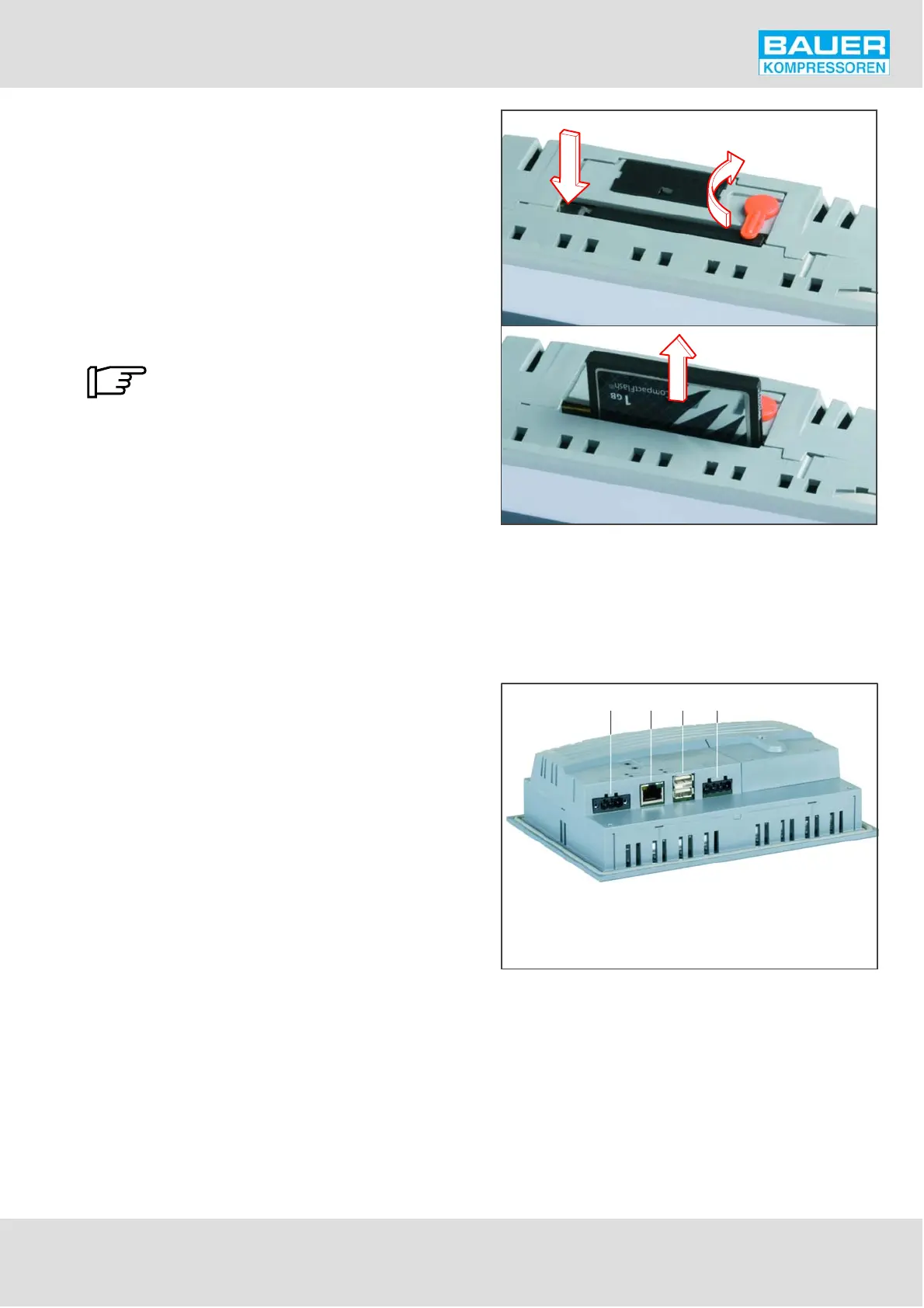
Fig. 40 CF card removal
1 Power supply
2 Ethernet interface
3 USB interfaces
4 X2X- Link -interface
1
2
Fig. 41 Connections
3
Instruction Manual w VERTICUS 5 Compressor Units
A-49
11.4.4. Storage media and connections
CompactFlash memory card
The configuration file for the control system is stored on a
CompactFlash card. This file is created automatically at the
factory during commissioning and does not need to be
modified. If you should, at a later date, make modifications
to the installation, which requires a change to the
configuration file, please contact BAUER customer service.
The memory card is located in a slot on the top of the
control system and can be replaced easily:
Only genuine BAUER spare parts
(Order No. N30223) to be used!
Switch the control system off and turn the orange safety
lever out of the way (1, Fig. 40).
Press the ejector button with a suitable tool (2) and remove
the card (3).
Insert a new card (only genuine spare part Order No.
N30223 to be used!), turn the locking lever over the
memory card and switch the control system on.
USB connection
On the bottom of the control system there are two USB in
terfaces (3, Fig. 41). These permit the connection of a USB
Memory Stick, from which data can be read and onto which
data can be written.


 To Next Page