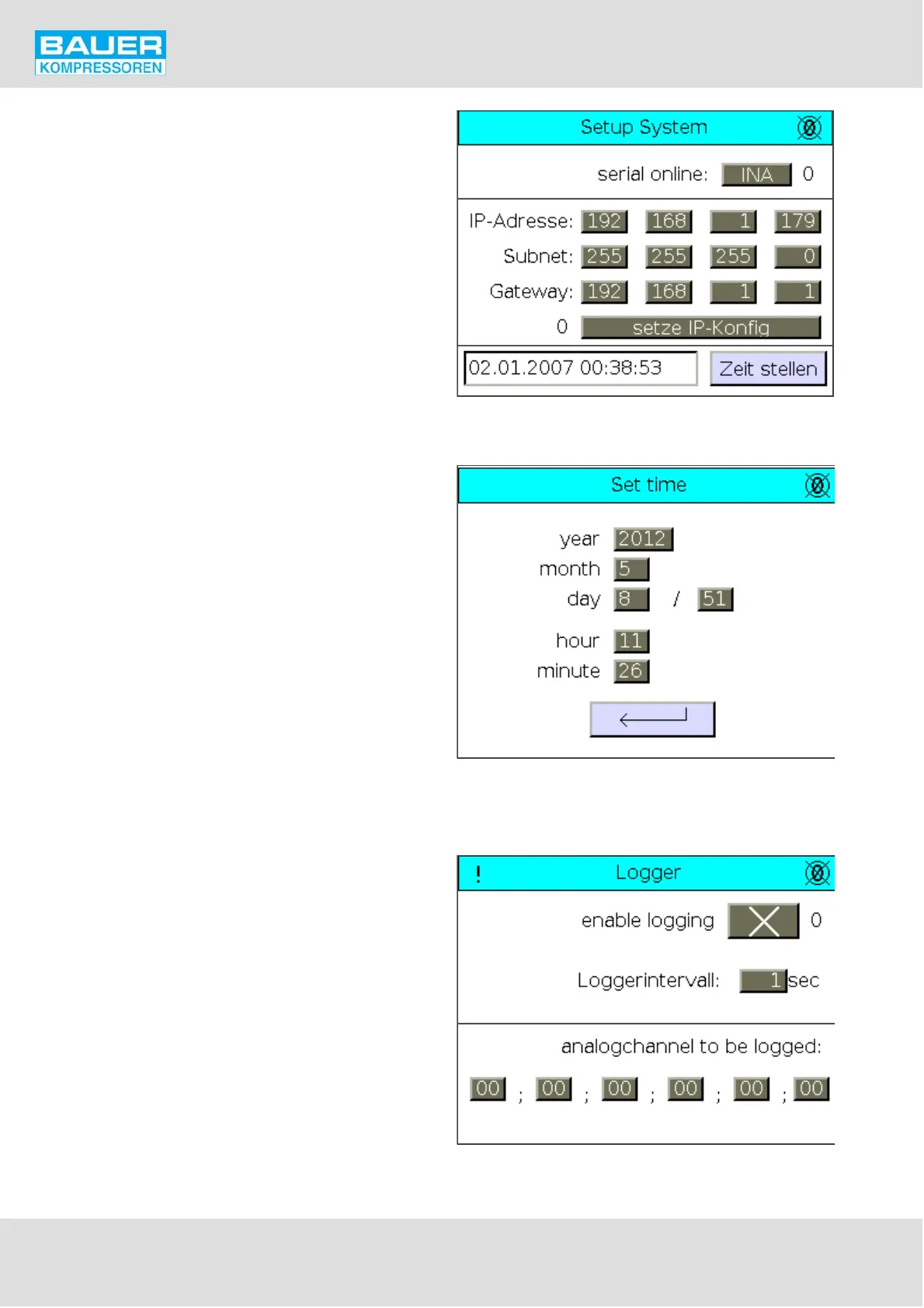
Fig. 79 System Setup
Fig. 80 Set time
Fig. 81 Logger page
Instruction Manual w VERTICUS 5 Compressor Units
A-64
Setup System
The System Setup page enables to enter the network data
for the connection with a computer.
Select a type of connection in the „serial online“ field:
INA: standard connection protocol
SLIP: connection protocol for B-Messenger 1
Enter the connection data as shown in Fig. 79 for connec
tion with B-Messenger 2.
After entering the data, press the "set IP config" button.
The date and time can be set by pressing the "set time" but
ton.
The time is set on the Set time page.
Enter the calendar day in the day field, on the right the day
of the week (1 = Monday, 2 = Tuesday, ...).
Logger
On the Logger scale the logger can be activated. This regu
larly, or in accordance with the set intervals, sends the va
lues of the selected analogue channels to the CF memory
card resp. to the FTP server. The channel number of the sen
sors is indicated (Ch ...) on the corresponding sensor setting
page. See Fig. 68.


 To Next Page