9-15
TotalAlert Innity™ HTM Medical Gas Notication System
4107 9016 60.01
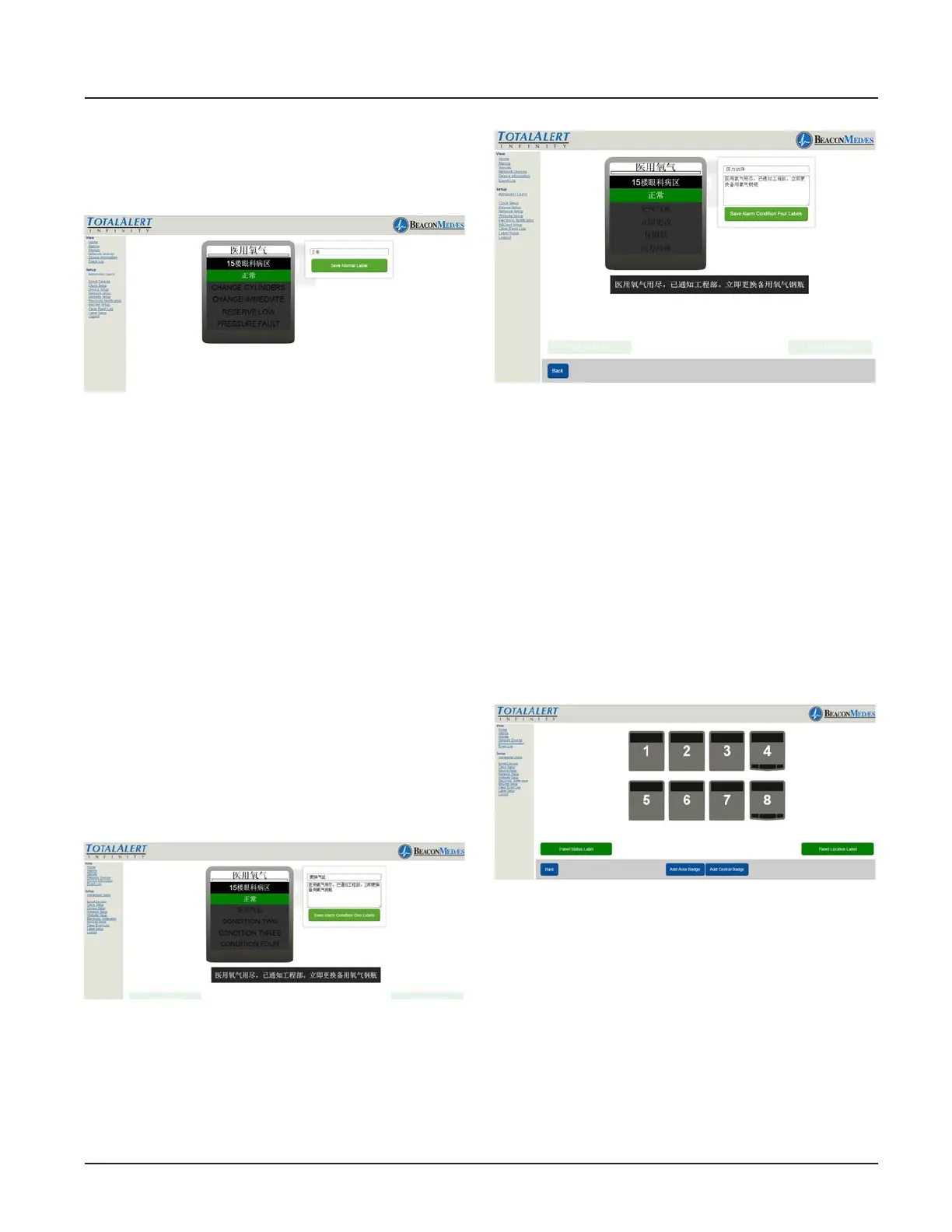
Enter non-latin language characters for the
location of gas being monitored. (See Figure
291)
Figure 291
TotalAlert Innity Central alarm allows for
setup of 4 alarm conditions (ie. Change
Cylinders, Change Immediate, Reserve Low,
Pressure Fault). A customized instruction
can be created for each condition.
12. To setup rst alarm condition, select
“CONDITION ONE” tab on badge (located
just under the NORMAL label). Enter non-
latin language characters for the Condition
One (ie. Change Cylinders). Then enter non-
latin language for instructions in the “Alarm
Condition One Instructions” section. (See
Figure 292)
13. To save, select “Save Location Label”
button.
Figure 292
14. Repeat step 12 and 13 to setup Condi-
tions Two, Condition Three, and Condition
Four. (See Figure 293)
Figure 293
15. Choose “Back” button to return to the
main setup screen.
Repeat steps 5 thru 15 for all Central
Badges.
To setup Area badges select the Area badge
number 4 or 8 (See Figure 294)
*Up to 6 Area badges can be added and
shown by selecting the “Add Area Badge”
button located at the bottom of the page.
Figure 294
16. From home screen, Click on the area
badge to setup non-latin language param-
eters. (See Figure 295)



 To Next Page