4-9
TotalAlert Innity™ HTM Medical Gas Notication System
4107 9016 60.01
Note:
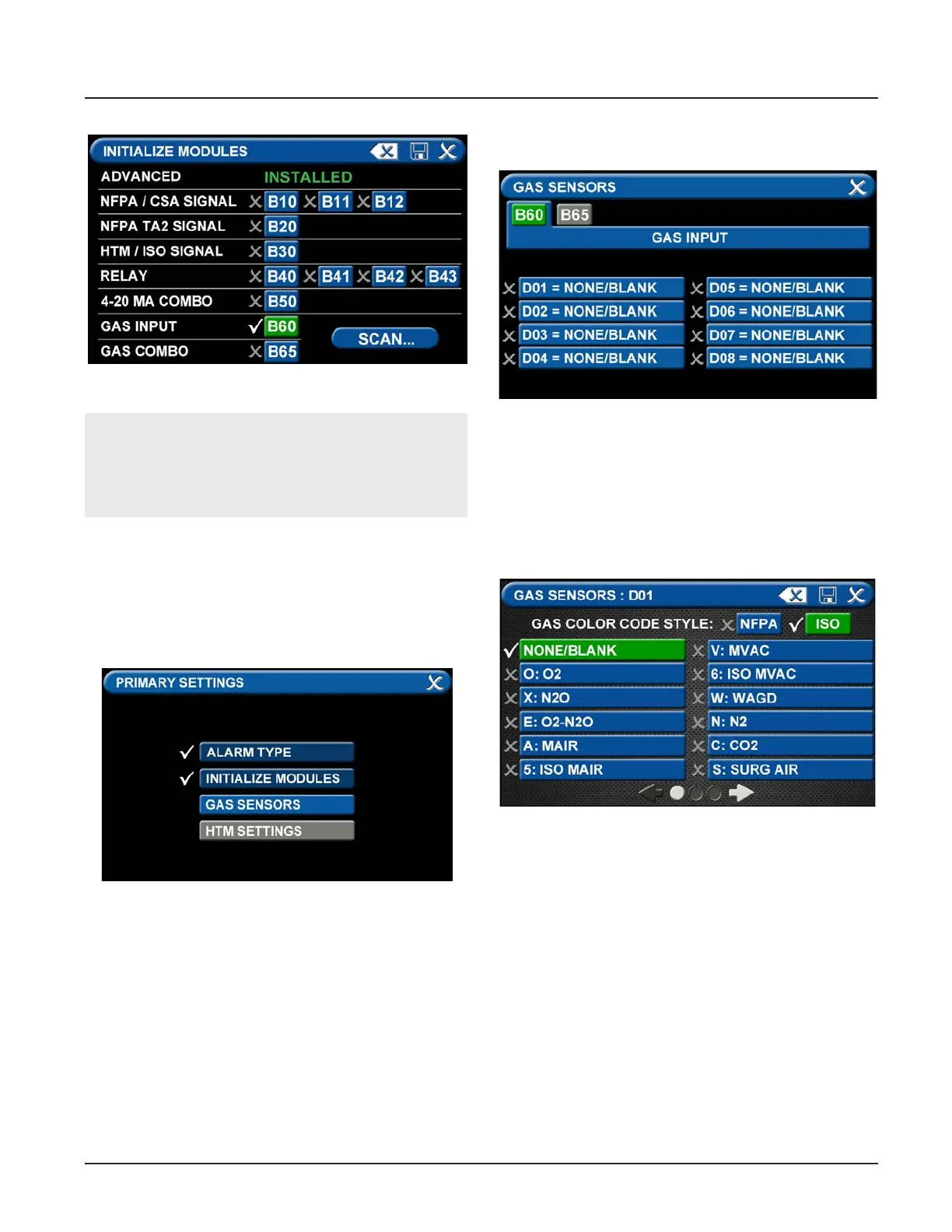
THE GAS INPUT / B60 board must be selected
during the conguration of an area alarm.
Figure 30: B60 board selected
Figure 31: Gas Sensors Tab
Figure 32: Gas Input Screen
Figure 33: Gas Sensors Screen
• Touch the Save button when you see checks beside
your selections.
Gas Sensors Tab
The PRIMARY SETTINGS screen will now display with
ALARM TYPE and INITIALIZE MODULES checked, GAS
SENSORS active, and the last tab grayed out.
• Touch the GAS SENSORS tab.
Users may select up to eight dierent gases on the GAS
INPUT screen. These gases correspond to the digital
gas sensors wired into the GAS INPUT / B60 board (see
section 2.4.2).
• To select the rst gas, touch the D01 = NONE/
BLANK tab.



 To Next Page