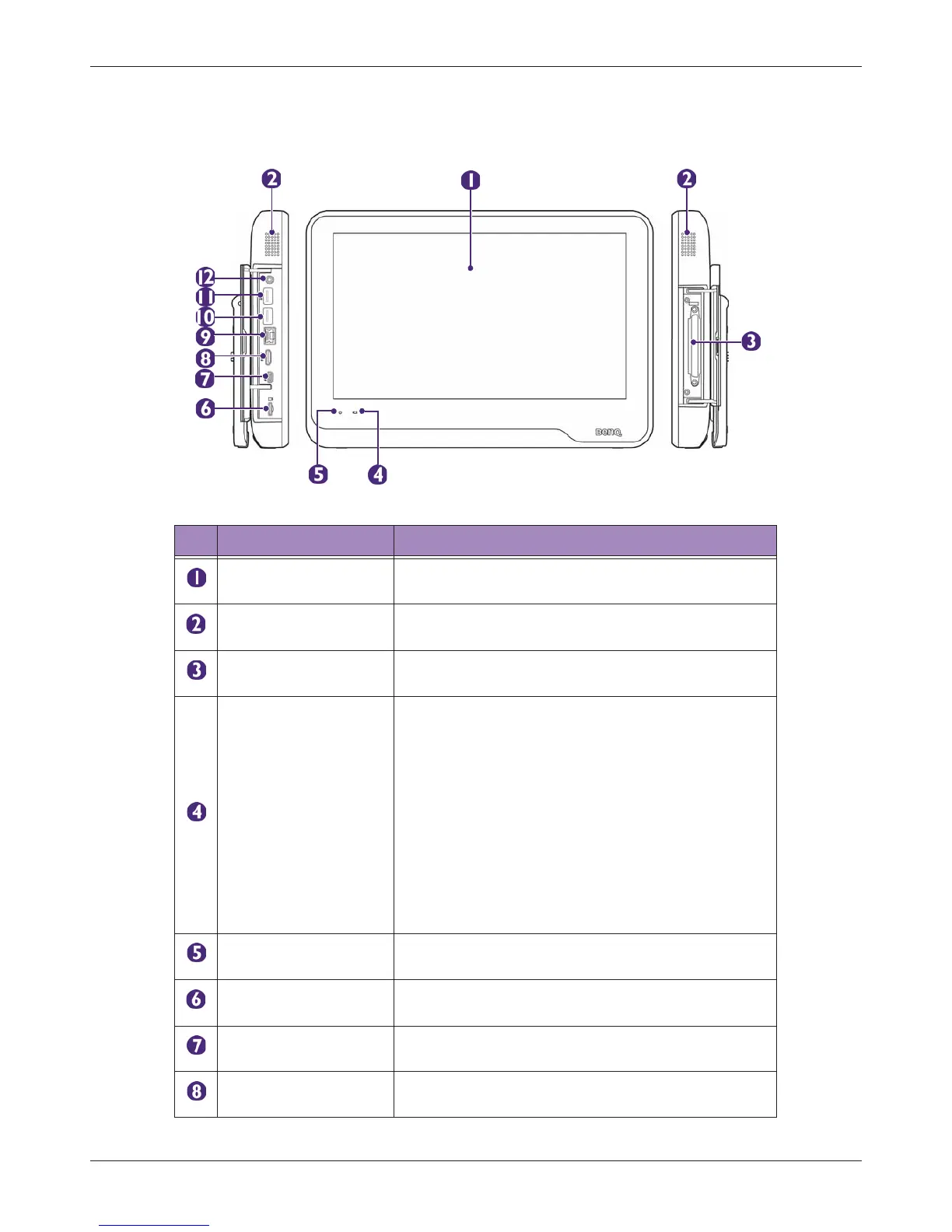
Overview
T3300 Diagnostic Ultrasound System | 26 | B00601-010 4/10/17
3.2 System Overview
3.2.1 Front and Side Views
Table 1 Front and Side Views
No. Component Function
Touch screen
Display system information and allow you to perform
operations using different gestures.
Speakers
Built-in speakers for playing sounds, which are
software-controlled.
Transducer connection
socket
Connect a transducer to the system. (See page 34)
Battery indicator
When the system is connected to power:
• If the system is turned off or enters sleep mode,
the battery indicator behaves in the following
lighting patterns:
– Steadily on orange when the battery is
charging.
– Steadily on green after the battery is charged.
• If the system is turned on, the battery indicator
lights off.
To monitor the battery level, see "Battery Status
Icons" on page 53.
Power indicator
Blink blue after the system enters Sleep mode. (See
page 52)
MicroSD card slot
Insert a microSD card into the microSD card slot to
exchange data from/to the system. (See page 32)
AUX port For use by authorized service personnel only
HDMI port
Connect the system to an HDMI (High-Definition
Multimedia Interface) device. (See page 39)



 To Next Page