Using the System
T3300 Diagnostic Ultrasound System | 53 | B00601-010 4/10/17
5.8.1 Battery Status Icons
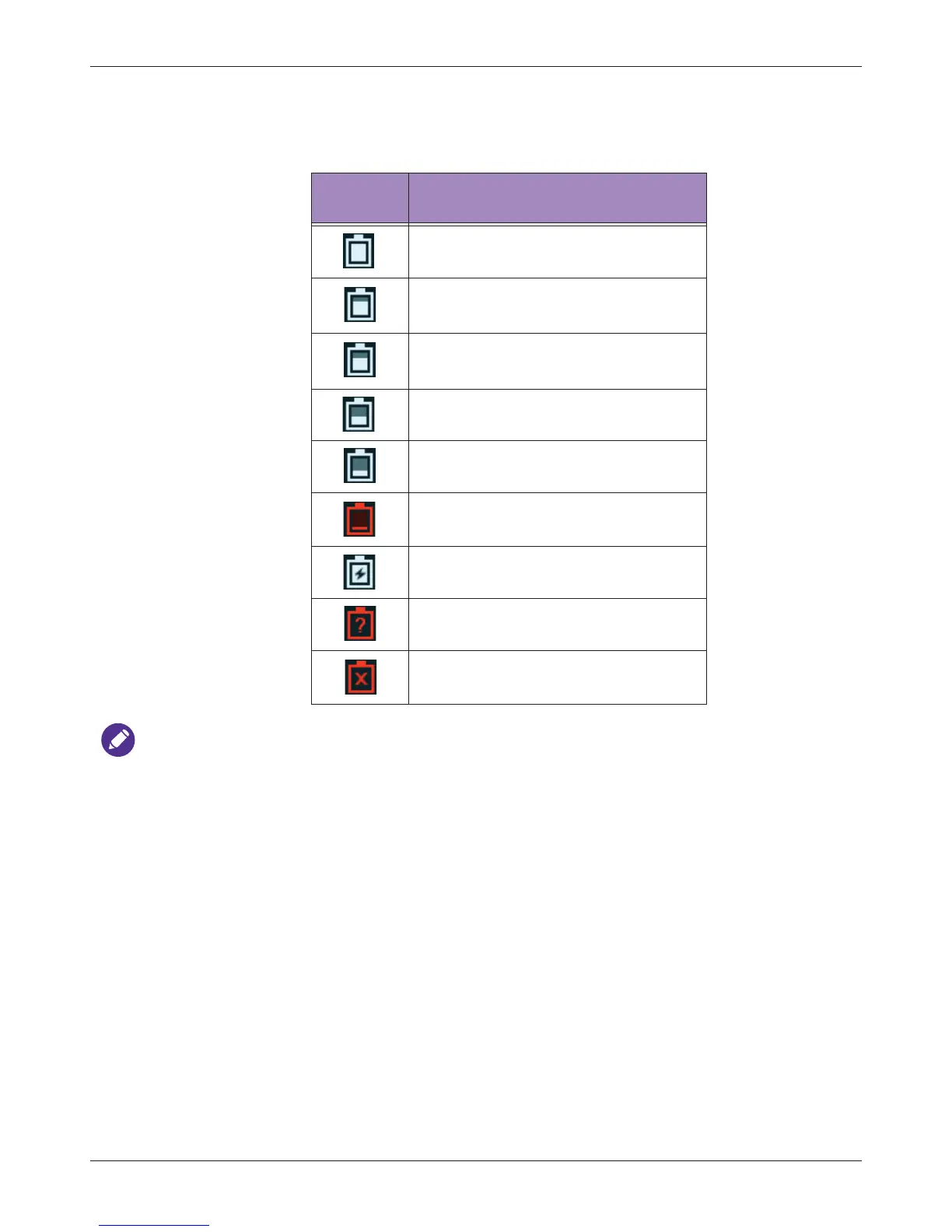
The battery level is indicated by icons shown on the system toolbar.
When the battery level reaches a critically low state, the system shuts down automatically.
5.8.2 Sleep Mode
Sleep mode is a low-power mode that conserves battery power and allows quick startup of the
system.It should be used only for short periods of time, such as when you transport the system
between exam locations.
To enter/exit Sleep mode, press the Power button.
5.9 Managing Disk Space
Always beware of the amount of free space in the system storage. If the disk space on the system
drive is full, the system cannot acquire images. To check the system storage used, open the Quick
Setup menu and watch the number of percentage next to Storage Usage.
The system sends warning messages when its available disk space reaches any of the following
level:
• The image storage is low: The disk space available for storing images is low. Delete some
stored exams to ensure that there will be enough room for new images.
Table 10 Battery status
Battery
status icon
Meaning
The battery is fully charged.
The battery is 80% to 99% charged.
The battery is 60% to 79% charged.
The battery is 40% to 59% charged.
The battery is 20% to 39% charged.
The battery is critically low.
The battery is charging.
The battery cannot be identified.
Battery temperature is too high or too
low and the battery stops charging.



 To Next Page