S10/S12/S10A/S12A Patient Monitor User’s Manual
8-26
Select 【Screen Setup】 quick keyselect 【Screen Layout】submenu.
Select 【Main Menu】 quick keyfrom 【Display】 column to select
【Screen Layout】.
2. Click on the location in the parameter area where QT parameters need to be
displayed and select 【ECG】【QT】.
NOTE: QTc value is calculated based on QT-HR, not ECG-HR calculation
leads. You can enter QT View to view QT-HR. For details, please refer to
8.8.4 Entering QT View.
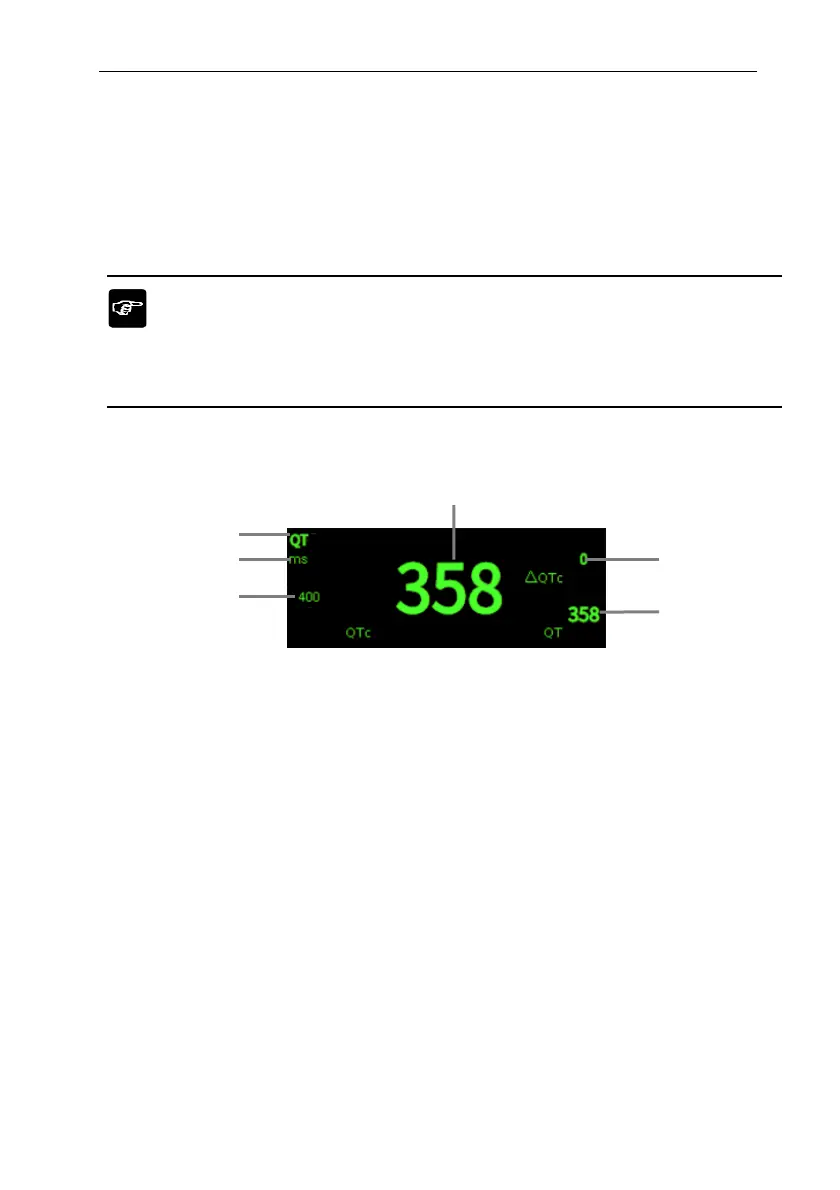
The QT parameter area is displayed as follows. Depending on the settings, the display
of your monitor may be different.
(1) QTc alarm limit (if QTc alarm is off, the alarm off icon is displayed here)
(2) Parameter Unit
(3) Parameter Label
(4) QTc value
(5) QTc value (the difference between the current value of QT
C
and the baseline
value; if QTc alarm is off, the alarm off icon is displayed on the right side of
the value)
(6) QT value
8.8.4. Entering QT View
QT View displays the current QT parameter values and waveforms, as well as
baseline/reference QT parameter values and waveforms. The steps to enter 【QT View】
are as follows:
1. Select QT parameter area to enter 【QT】 menu.
4
5
6
3
2
1



 To Next Page