S10/S12/S10A/S12A Patient Monitor User’s Manual
1-12
Select the 【Main Menu】quick key select 【Quick keys】 from
【Display】 column.
2. Set the required quick keys:
Add quick key: Select desired quick key from the 【Choices】 column
on the left, and then select 【Add】.
Delete parameters: Select desired quick key from the 【Selected】
column on the right, and then select 【Delete】.
Move the display position of quick key: From the 【Selected】quick key
column on the right to select quick keys needed to be moved. And select
【Move To Up】, 【Move To Down】, 【Mov e To Top】 or 【Move
To Bottom】 as needed.
Select 【Default Setting】 and the quick key settings will restore the
factory default settings.
1.5.3. Menu
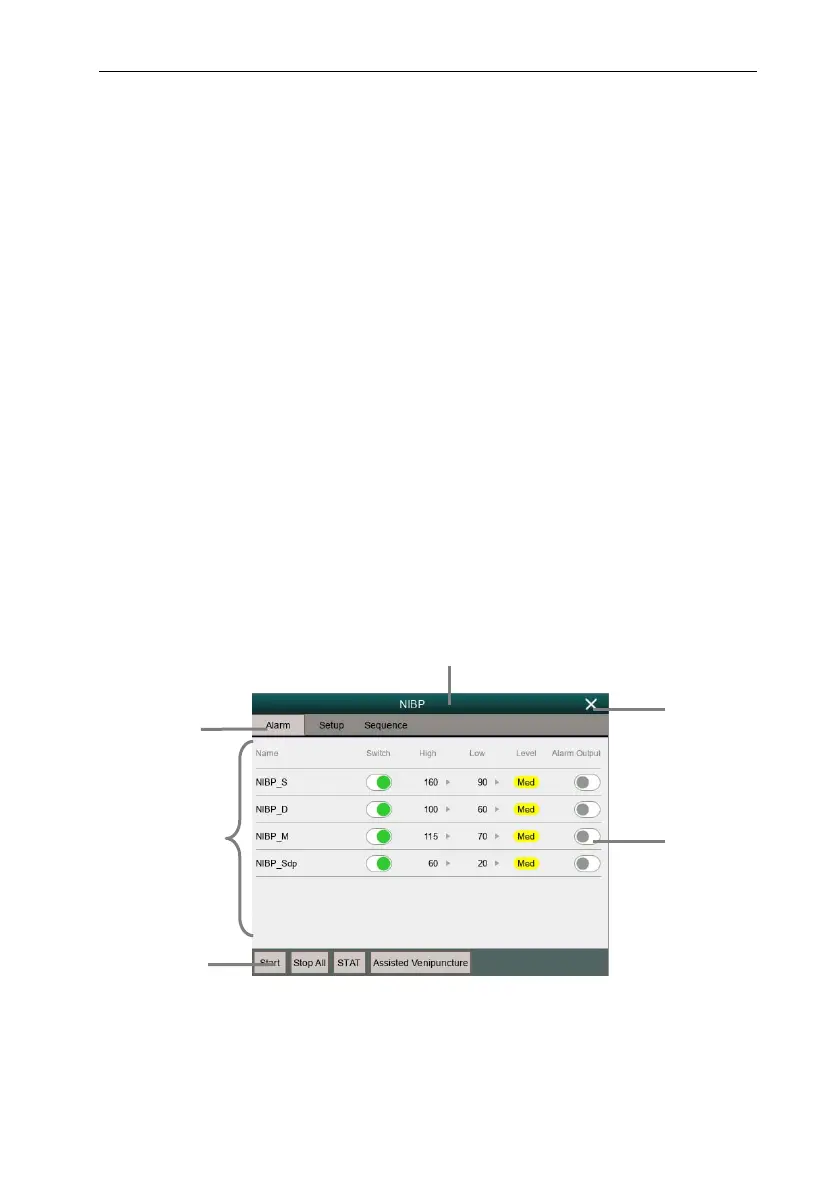
The styles of the various menus are basically similar, see the picture below:
1. Menu title:Summary of the current menu.
2. Submenu button:Press this button to enter the corresponding submenu.
3. Main display area of
menu: Display menu options.
2
1
5
6
4
3



 To Next Page