Instruction manual GSP Machine and operating elements
38107010002 en-US 33 / 92
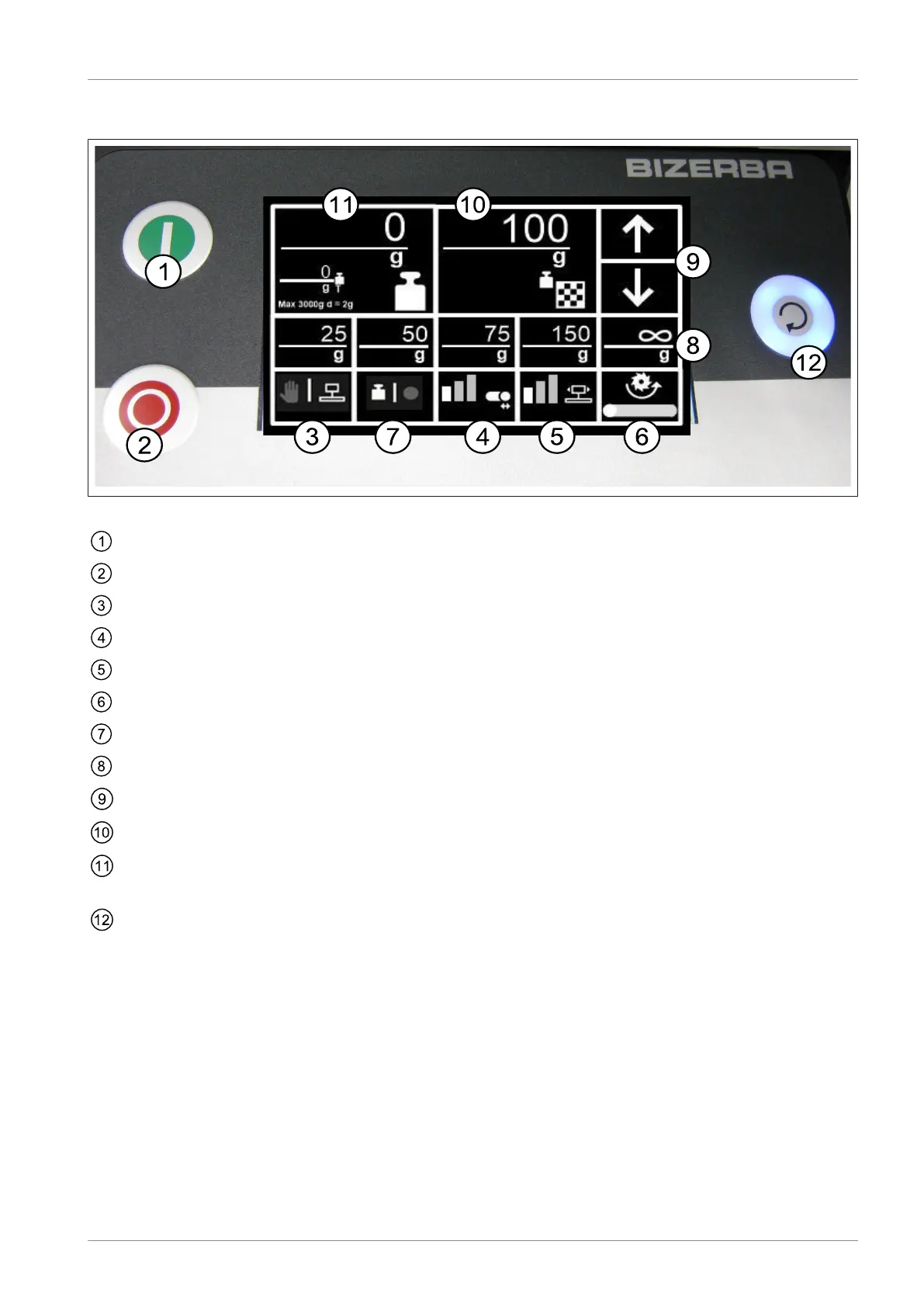
5.2.2 Membrane keyboard GSP HD W with HMI touchscreen
Fig.21: Membrane keyboard GSP HD W
<I> (green) voltage is present at the drives
<O> (red) The drives will be switched off (reduced operating force)
Toggling between manual operation and automatic operation
Stroke width selection
Selection of number of carriage strokes
Select a blade speed / blade speed for sharpening
Toggling between slicing to number of target slices and slices to target weight
Direct selection keys for number of target slices / target weight value
Increasing / reducing the number of slices by 5 or the weight by 0.05 oz (2 g)
Number of slices (target/current) / target weight value
Display of current weight value
Tare <T>
<Execute> (pulsating if an action can be started; lights up during slicing)
Starting and stopping of the slicing process


 To Next Page
 Loading...