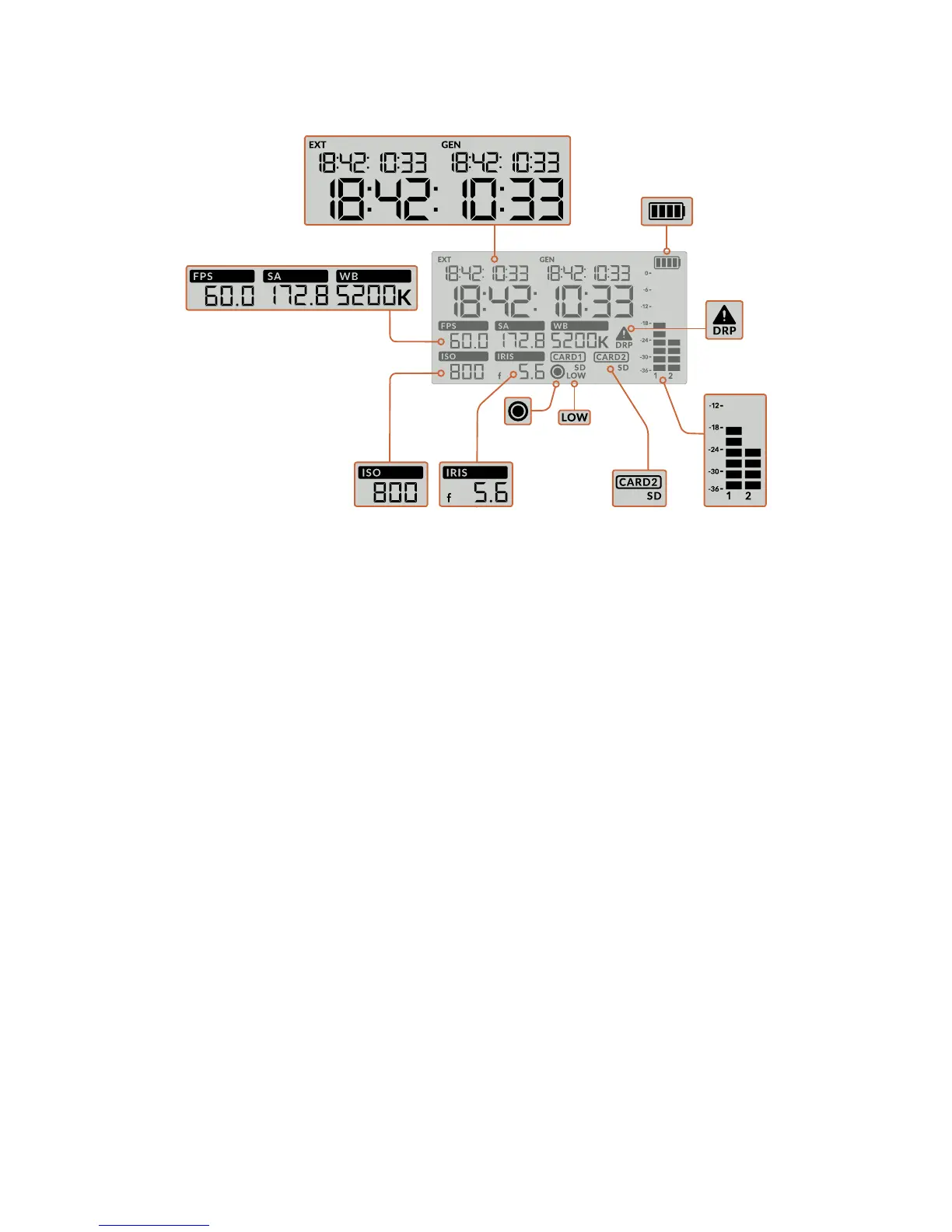
Timecodes
Your URSA Mini Pro 4.6K displays three timecodes. If you have an external timecode
connected, this will be shown under the 'ext' indicator in the top left of the status LCD.
Your URSA Mini's internally generated timecode is shown next to this under the 'gen'
indicator. Both the external and generated timecodes are shown in hours, minutes,
seconds and frames.
The larger, main timecode indicator displays your current timecode as either clip
duration or timecode. You can switch between these two display modes by pressing
the 'timecode' button underneath the status LCD.
Battery indicator
If your URSA Mini Pro 4.6K is running on battery power, this indicator displays remaining
battery life in 25% increments. Each of the battery indicator’s four bars corresponds to
25% battery life remaining. When your battery drops below 20% charge, the color of the
status LED, near the record button begins to flash. It will alternate slowly between red
and orange during recording and alternate between white and orange during
standby mode.
This indicator is not shown when your camera is running off mains power.
FPS, Shutter Angle, White Balance
The ‘FPS,’ ‘SA,’ and ‘WB’ indicators display your camera’s current frame rate, shutter
angle and white balance. The ‘fps’ indicator shows the current sensor frame rate.
Formore information on sensor and project frame rates, see the 'touchscreen controls'
section in this manual.
ISO
Displays your camera’s currently set ISO.
Iris
Displays your current lens aperture. Depending on your lens type, this will be
displayedas an ‘f' or ’T’ stop.
Battery indicator
Audio metersCard indicatorIris
Low record
time remaining
FPS, Shutter Angle, White Balance
Record
indicator
Timecodes
ISO
Dropped
frame
indicator
63URSA Mini Pro 4.6K Control Buttons










 To Next Page