9
1.4 How to Operate Purion 1.4 How to Operate Purion
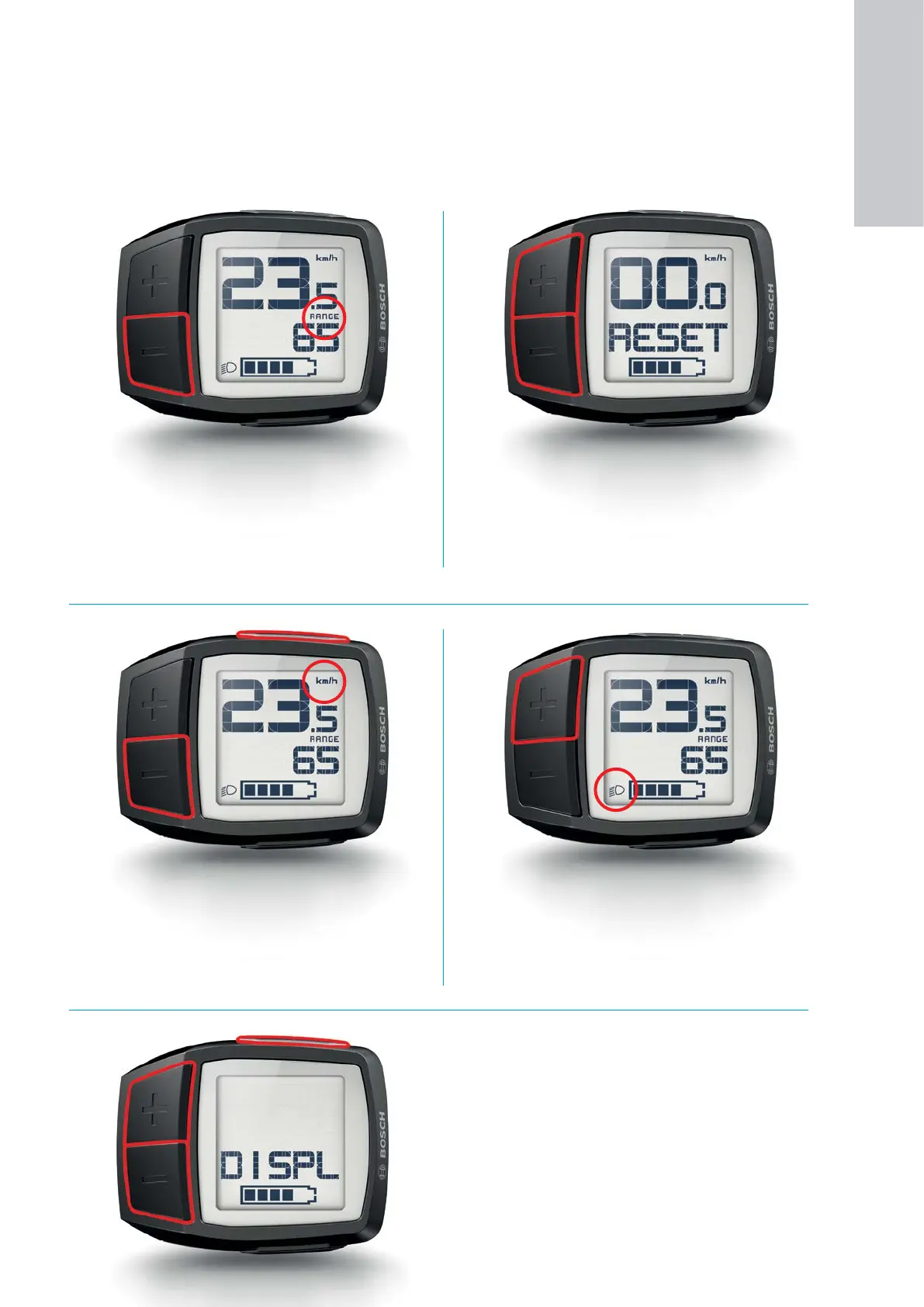
Changing the display of functions
X Repeated, medium-duration pressing of the "–"
button sequentially displays "TRIP", (trip distance
odometer), "TOTAL" (total distance mileage) and
"RANGE" (rechargeable battery range).
X A change of riding mode is briefly displayed.
Switching the display between kilometers
and miles
1. Press and hold the "–" button.
2. Briefly press the "On/Off" button.
Setting the display brightness and querying
the software versions
1. While the system is switched Off, simultaneously
press and hold the buttons "–" and "+".
2. In addition, briefly press the "On/Off" button.
3. The software version information is displayed as
ticker text.
4. While the ticker text is actively running, adjust the
brightness by means of the "+" and "–" buttons.
Reset of the "TRIP" distance odometer
1. Simultaneous, long-duration pressing the buttons
"+" and "–".
2. "RESET" appears on the display.
3. Press and hold the two buttons.
4. The "TRIP" distance odometer is reset to zero.
Switching bike lights on/off
1. Medium-duration pressing of the "+" button acti-
vates the front light and rear light.
2. To switch off, long-duration press the "+" button.
1
ON-BOARD
COMPUTER










 To Next Page