M610 Label Printer User Manual 7
Setup
Power
Installing the Battery
Automatic Shut Down
To conserve energy, the printer automatically turns off after a period of inactivity. Any data on the
screen at the time of auto shutdown is retained and available the next time the Power button is
pressed to restart the printer. When using the AC adapter, power is constant so there is no drain on
the battery. In this case, auto shutdown will not activate. To set the inactive time, see “Printer
Configuration” on page 9.
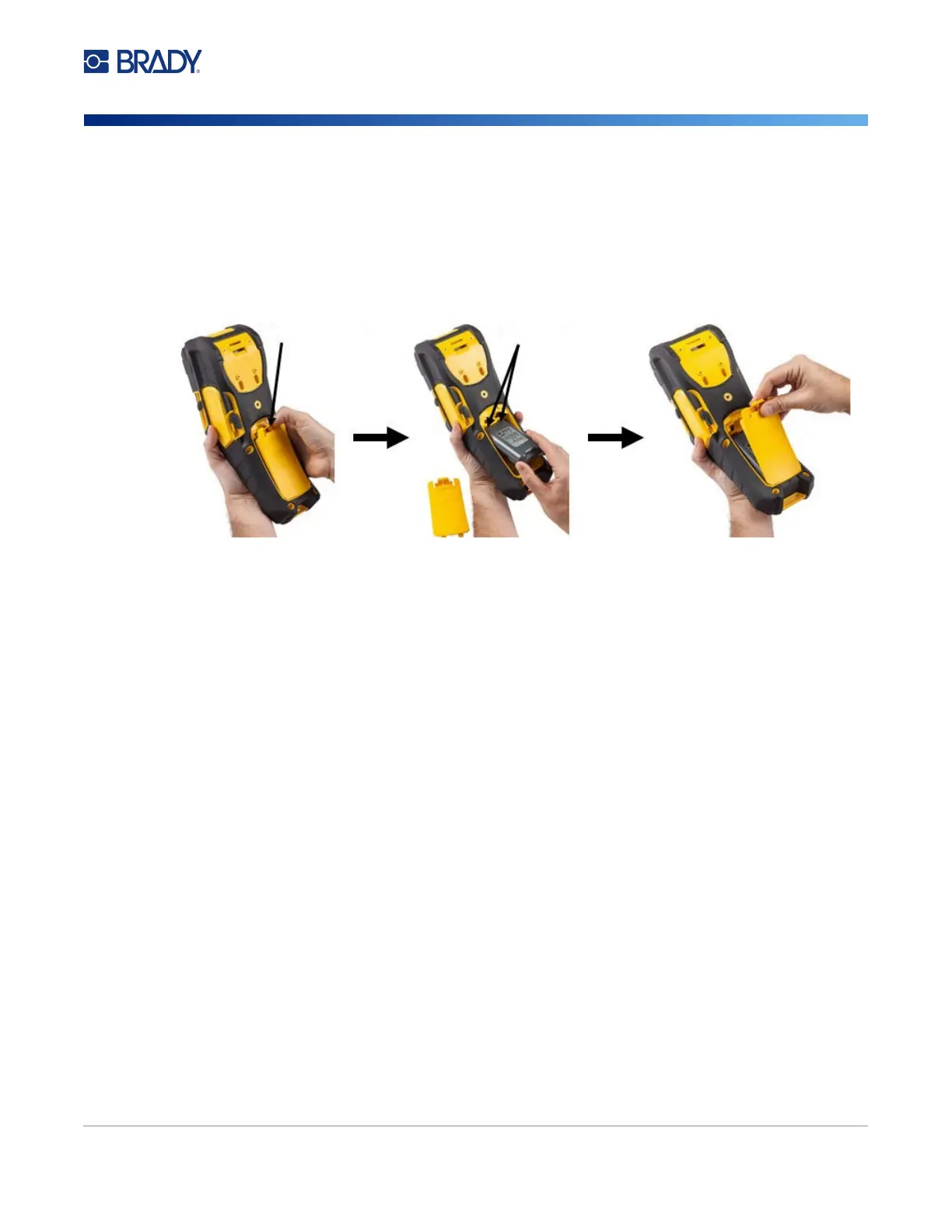
1. On the backside of the
printer, push down on the
release latch and swing the
battery compartment cover
up and out.
2. With the battery label facing
outward, insert the battery
pegs into the peg slots at the
top of the compartment; then
tip the battery downward into
place.
3. Re-insert the tabs on the
battery cover at the base of
the compartment and snap it
into place.
Release Latch
Peg Slots



 To Next Page