M610 Label Printer User Manual 17
Setup
Loading Supplies
Loading Bulk Label Supply
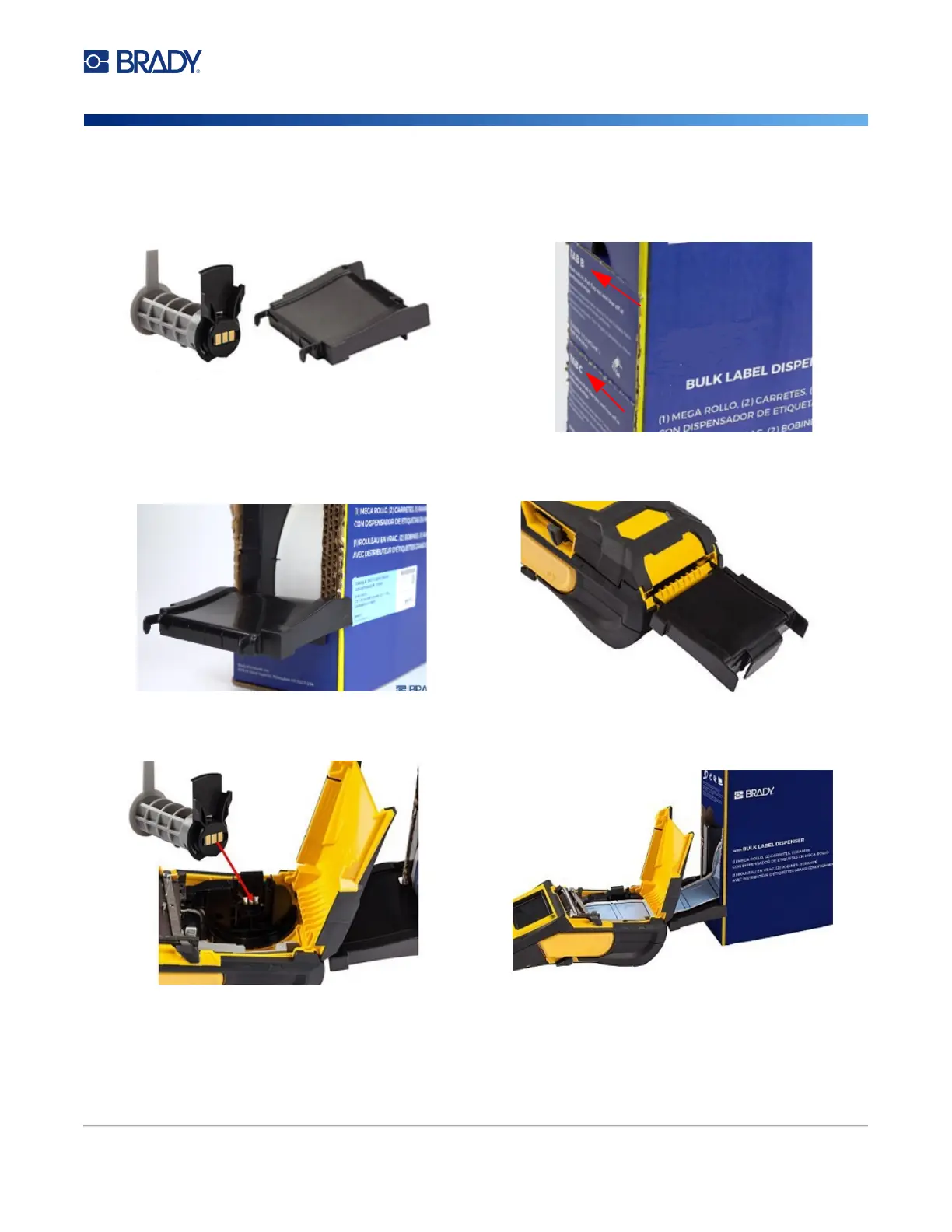
1. Remove the M610 Label Printer label core and the
label feed ramp from the box.
2. On the bulk label supply box, push tabs B and C in,
then pull the perforated flap down and tear off.
3. Attach the label feed ramp to the bottom of the
perforation, with the ramp arms on the outside of the
box.
4. Attach the ramp hooks to the outside of the bulk
label feed path on the printer.
5. Insert the M610 Label Printer label core (smart cell
facing left) into the printer. Adjust the media guide
as needed.
6. Pull the loose end of the bulk label supply out of the
box punch-out and thread over the tray and into the
bulk label feed path on the printer.
7. Continue to feed the leading edge of the label roll over the core and through the guide slots until it catches.
8. Turn the printer on and press FEED to feed the label supply through the printer.
9. Close the cover.
Note: Bulk label cores cannot be re-used. When installing bulk labels replace the core for each new box of labels.
Label
Core
Label Feed Ramp



 To Next Page