M610 Label Printer User Manual 29
General Operation
Printing
2. Make your selections. For help using the screen, see “Settings Screens” on page 22.
• No. of Copies: Enter the number of copies desired.
• Print Range: Select the From field and enter the number of the first label to be printed.
Select the To field and enter the number of the last label to be printed.
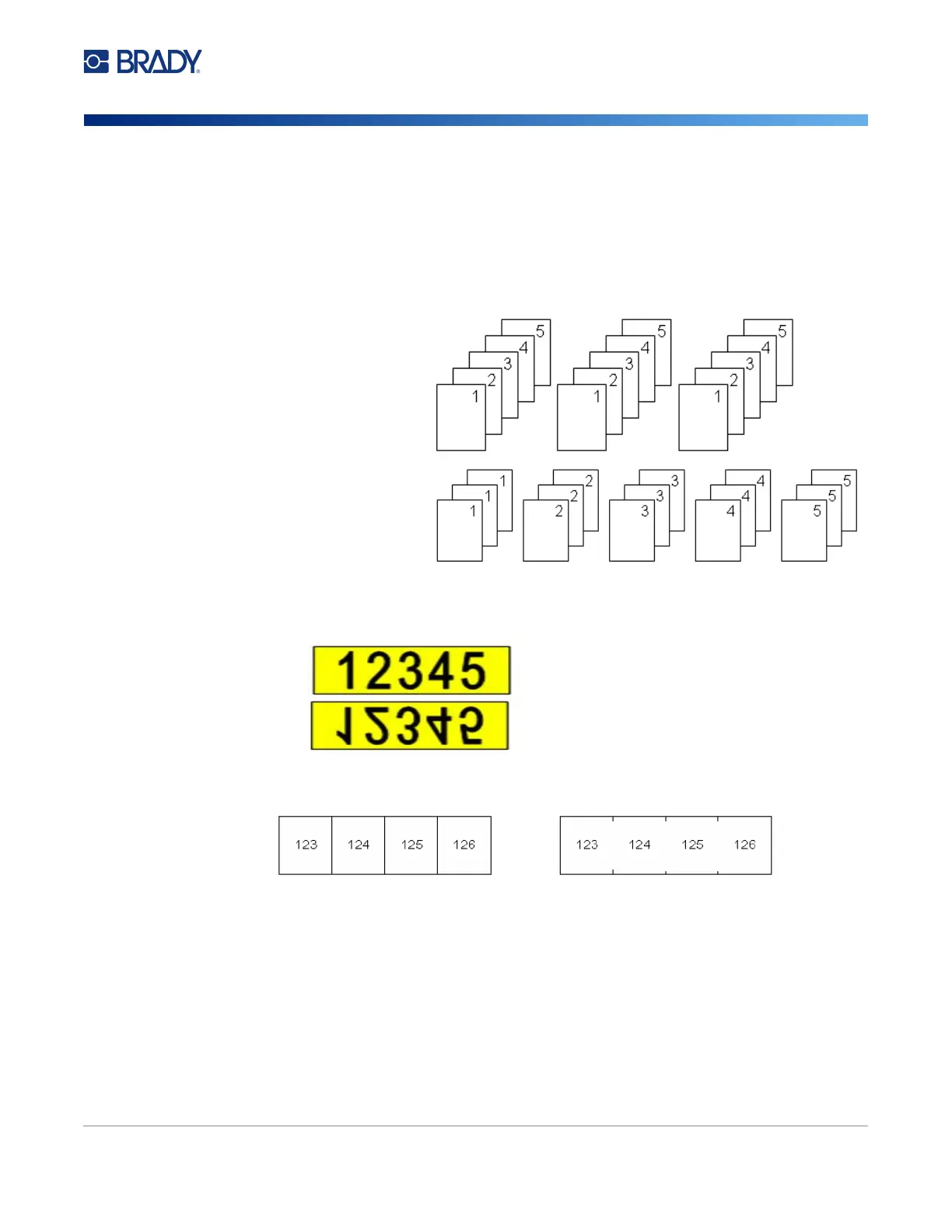
• Collate: Collation determines the order in which multiple copies of each label will print. For
example, suppose you have set the number of copies to three, and you have five labels in
the file.
• Mirrored Print: Mirrored print takes all data on a label and flips it to provide a mirror image.
Mirroring displays on the printed label only. Mirrored print applies to the entire label; you
cannot mirror data in an individual area.
• Separator: To separate different labels on continuous label supply, add a separator by
selecting it from the drop down list.
3. Navigate to OK and press ENTER.
With Collate selected,
you get three sets of all
five labels.
With Collate cleared,
you get three copies of
label 1, then three
copies of label 2, and
so on.
On screen
As printed
Line Separator Tic Separator



 To Next Page