X7-8-Install-IG100 Installation Guide
Brocade
®
X7-8 Director Hardware Installation Guide
Power Supply Assemblies
AC Power Supply Overview
This device supports the following AC power supply assemblies. All power supplies installed in the device must be of the
same type and must match the airflow of installed fan assemblies.
•
The power supply model supporting nonport-side air intake (NPI) provides 1450W (100–120 VAC) and 2870W (200–
240 VAC). This assembly has two fans that move the air from the nonport side to the port side of the device.
•
The power supply model supporting nonport-side air exhaust (NPE) provides 1450W (100–120 VAC) and 2870W
(200–240 VAC). This assembly has two fans that move the air from the port side to the nonport side of the device.
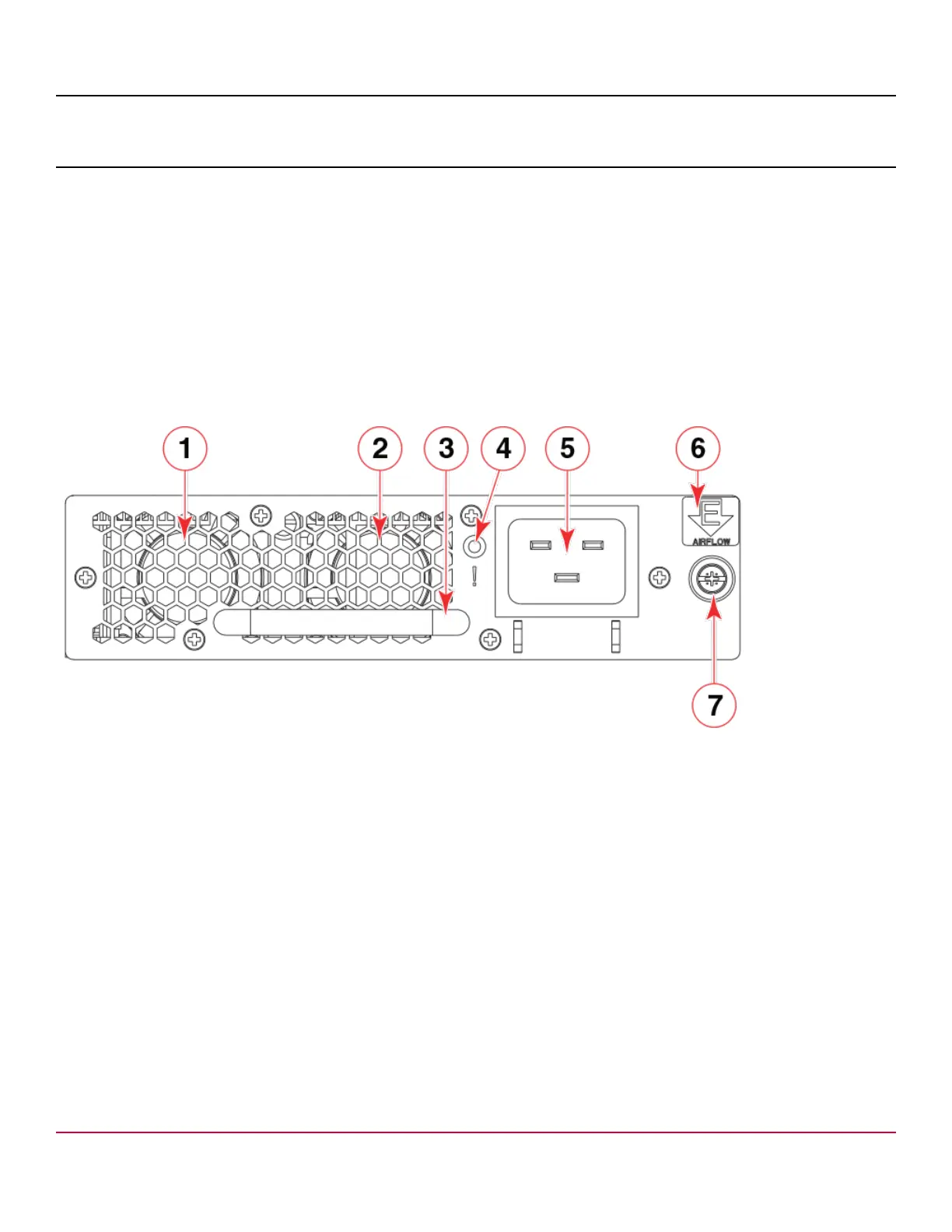
The following figure illustrates the power supply assembly components.
Figure 51: AC Power Supply Assembly
1. Fan 1
2. Fan 2
3. Handle
4. Status LED
5. AC Power Cable Receptacle
6. Airflow Label
7. Captive Screw
The Brocade X7-8 Director can have up to four power supplies in a 2+2 full redundant configuration. Only two PSUs are
required at any given time to support all possible blade configurations using AC high-line (200 to 240 VAC). See "Power
Supply Requirements" in the Brocade X7 Director Technical Specifications for minimum power supplies required for AC
low and high voltage line operation, redundancy in case of power supply failure, and other specifications.
Redundant AC primary power connections ensure high availability. Each power supply has its own connector. If four
power supplies are installed, four primary power connections are required for the X7-8 Director for optimum efficiency and
redundancy.
Power supplies can be removed and replaced without special tools. If replacing one power supply, the device can
continue operating during replacement if procedures are followed in this guide.
X7-8-Install-IG100
162


 To Next Page