3 - 96
Main unit
Main unit
5
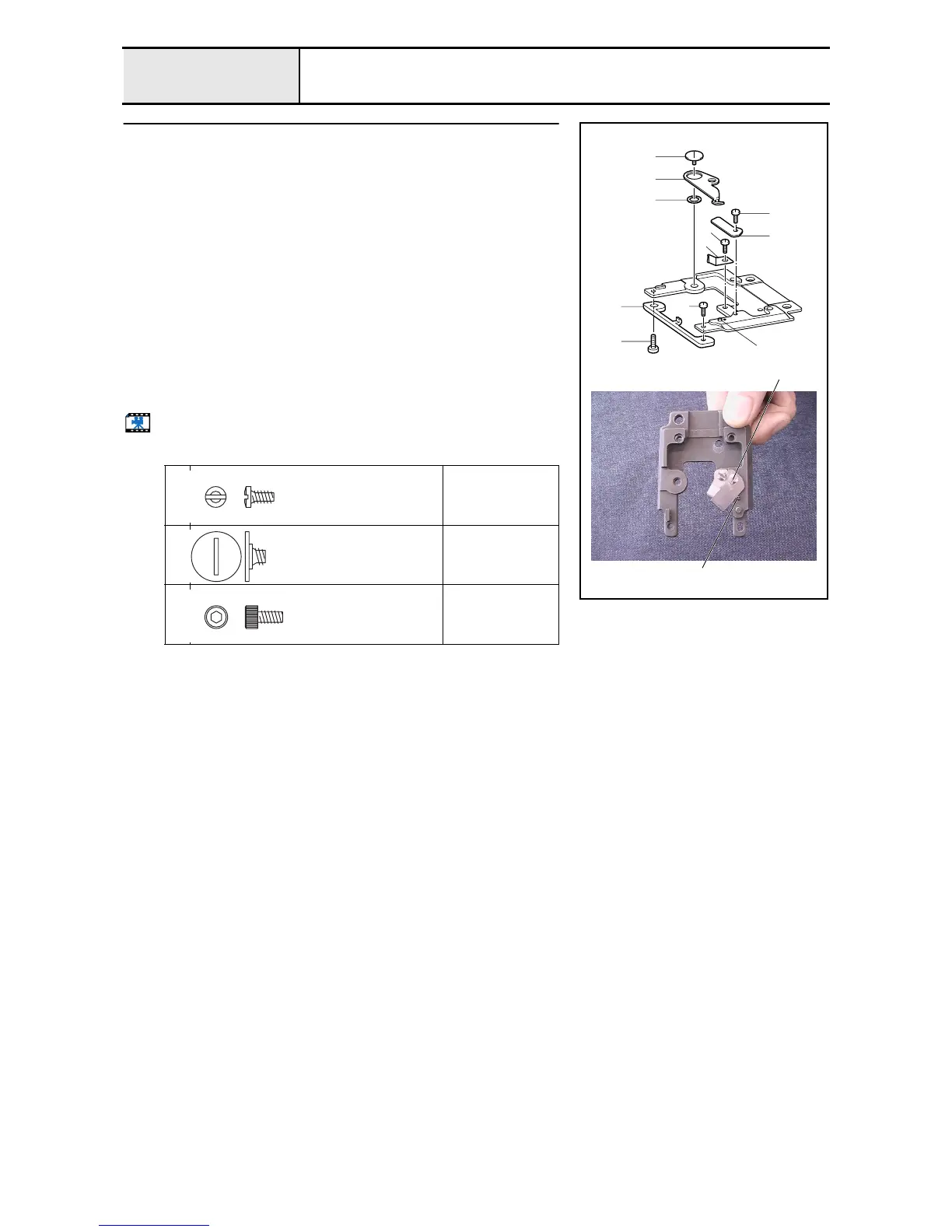
Needle plate base assembly
1. Attach the thread holding plate 1 to the needle plate base assembly with
the screw 1.
2. Attach the fixed knife 2 to the needle plate base assembly with the screw
2.
*Key point
• Tighten the screw 2 while pushing the fixed knife against the
pin 3 on the needle plate base assembly.
3. Attach the movable knife 4 and the movable knife collar 5 to the needle
plate base assembly with the screw 3.
4. Attach the rotary hook stopper 6 to the needle plate base assembly with
the screws (4 5).
*Key point
• Temporarily tighten the screws 4 and 5 first. Firmly tighten
them after completing 4 - 22 "Rotary hook stopper clearance
adjustment."
Start movie clip (CD-ROM version only)
1
2
5
Torque
0.78 – 1.18 N-m
3
Torque
0.78 – 1.18 N-m
4
Torque
Hand start
3
4
5
6
4
3
5
1
1
2
2
3
2
Screw, P/F
Color;
Screw
M4
Color;
Bolt, Socket
M3X6
Color; Black















 To Next Page