i: Setting the ISO SpeedN
110
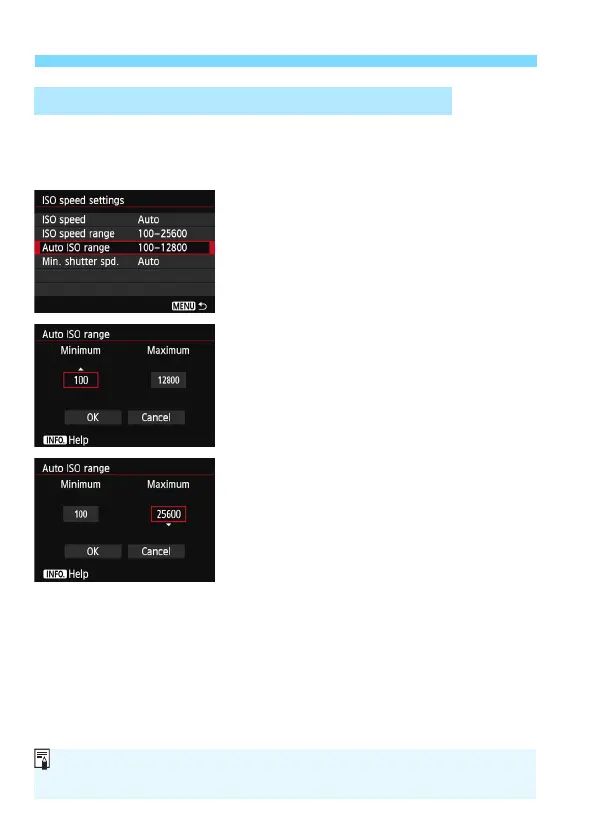
You can set the automatic ISO speed range for Auto ISO within ISO 100
- 25600. You can set the minimum limit within ISO 100 - 12800, and the
maximum limit within ISO 200 - 25600 in whole-stop increments.
1
Select [Auto ISO range].
Select [Auto ISO range], then press
<0>.
2
Set the minimum limit.
Select the minimum limit box, then
press <0>.
Press the <V> key to select an ISO
speed, then pr
ess <0>.
3
Set the maximum limit.
Select the maximum limit box, then
press <0>.
Press the <V> key to select an ISO
speed, then pr
ess <0>.
4
Exit the setting.
Press the <U> key to select [OK],
then press <0>.
X The menu reappears.
3 Setting the ISO Speed Range for Auto ISO
The [Minimum] and [Maximum] settings will also apply to the ISO speed
safety shift’s minimum and maximum ISO speed (p.306).






 To Next Page