280
Whenever you set the power switch to <1> or <2>, the Self
Cleaning Sensor Unit operates to automatically shake off the dust on
the front of the sensor. Normally, you need not pay attention to this
operation. However, you can choose to perform sensor cleaning at any
time, or disable it.
1
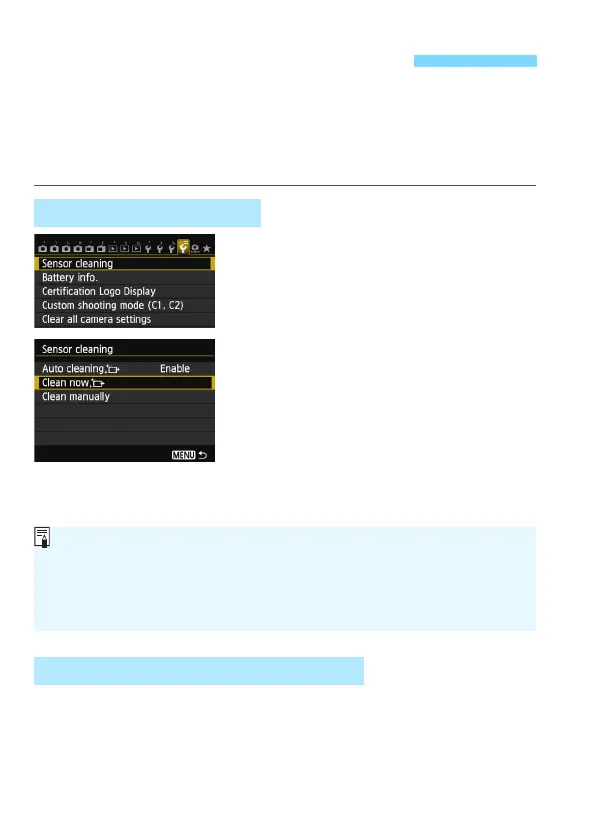
Select [Sensor cleaning].
Under the [54] tab, select [Sensor
cleaning], then press <0>.
2
Select [Clean nowf].
Select [Clean nowf], then press
<0>.
Select [OK] on the dialog screen,
then pres
s <0>.
X The screen will indicate that the
sensor is being cleaned. Although
there will be a shutter sound, a
picture is not taken.
In step 2, select [Auto cleaningf] and set it to [Disable].
X The sensor cleaning will no longer be executed when you set the
power switch to <1> or <2>.
f Automatic Sensor Cleaning
Cleaning the Sensor Now
Disabling Automatic Sensor Cleaning
For best results, perform the sensor cleaning with the camera placed
upright and stable on a table or other flat surface.
Even if you repeat the sensor cleaning, the result will not improve much.
Immediately after the sensor cleaning is finished, the [Clean nowf]
option will remain disabled temporarily.






 To Next Page