244
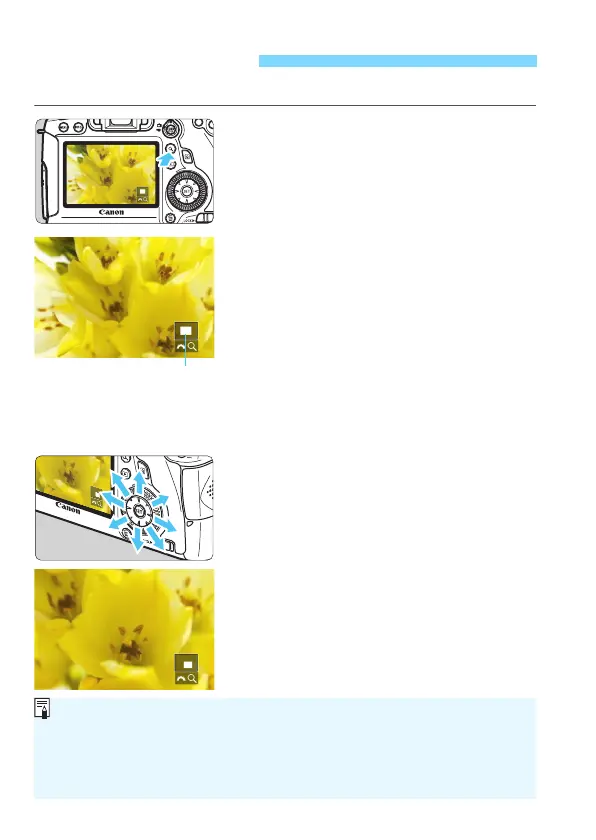
You can magnify a captured image by approx. 1.5x to 10x on the LCD monitor.
1
Magnify the image.
The image can be magnified during
image playback (single-image display),
during image review after image
capture, and from shooting-ready state.
Press the <u> button.
X
The magnified view will appear. The
magnified area and [
6u
] will be
displayed on the lower right of the screen.
The image magnification increases as you
turn the <
6
> dial clockwise. You can
magnify the image up to approx. 10x.
The image magnification decreases
as you turn the <6> dial
counterclockwise. Turning the dial further
will display the index display (p.242).
2
Scroll around the image.
Use <9> to scroll around the
magnified image.
To exit the magnified display, press
the <u> button or <x> button and
the single-image display will
reappear
.
u Magnified View
Magnified area position
In magnified view, you can turn the <5> dial to view another image at
the same magnification.
The image cannot be displayed in the index display during the image
review immediately after shooting.
A movie cannot be magnified.






 To Next Page