155
You can shoot images preserving a wide tonal range where the
highlight and shadow detail would otherwise be lost. HDR shooting is
effective for landscape and still-life shots.
With HDR shooting, three images of different exposures (standard
exp
osure, underexp
osure, and overexposure) are captured for
each shot and then merged together automatically. The HDR
image is recorded as a JPEG image.
1
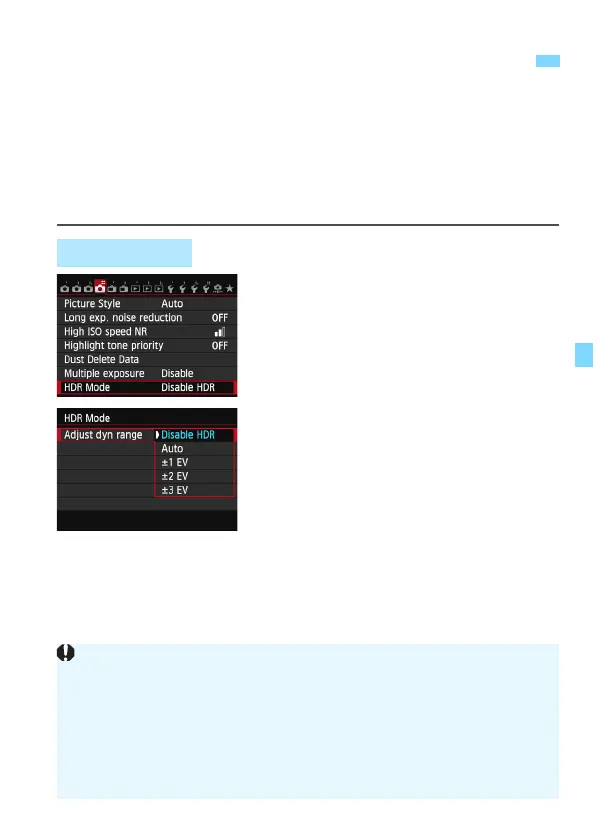
Select [HDR Mode].
Under the [z4] tab, select [HDR
Mode], then press <0>.
X The HDR mode screen will appear.
2
Set [Adjust dyn range].
Select the desired dynamic range
setting, then press <0>.
Selecting [Auto] will ha
ve the
dynamic range set automatically
depending on the image’s overall
tonal range.
The higher
the number, the wider the
dynamic range will be.
To exit HDR shooting, select [Disable
HDR].
w
: HDR (High Dynamic Range) Shooting
N
HDR Shooting
Only the merged HDR image will be saved. The three images used to
produce the merged HDR image will not be saved.
You cannot select RAW and RAW+JPEG. The HDR mode cannot be set
if RAW or RAW+JPEG is set.
If you set AEB, white balance bracketing, Multi Shot Noise Reduction,
multiple shot exposures or if you shoot bulb exposures or a movie, HDR
mode cannot be set.
Flash will not fire during HDR shooting.






 To Next Page