180
1
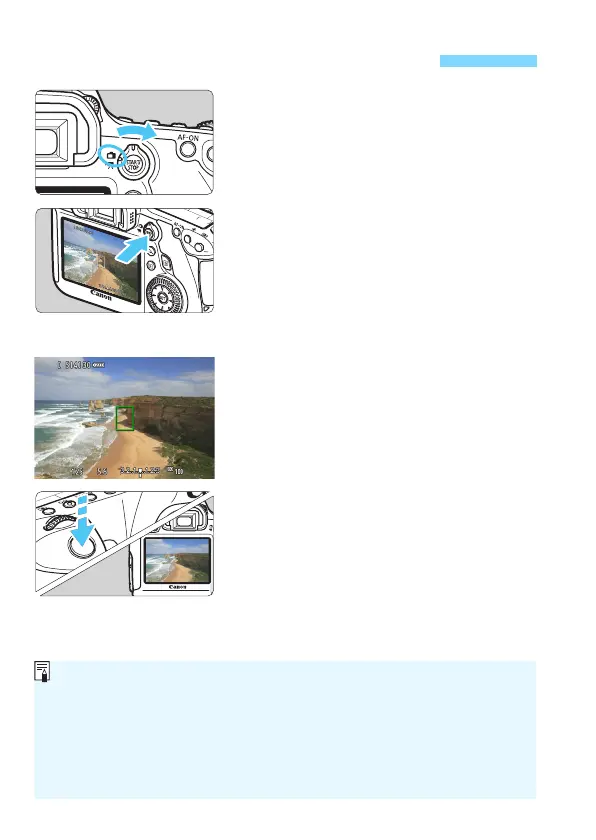
Set the Live View shooting/Movie
shooting switch to <A>.
2
Display the Live View image.
Press the <0> button.
X The Live View image will appear on
the LCD monitor.
The Live V
iew image will closely
reflect the brightness level of the
actual
image you capture.
3
Focus the subject.
When you press the shutter button
halfway, the camera will focus with
the current AF method (p.192).
4
Take the picture.
Press the shutter button completely.
X
The picture will be taken and the captured
image is displayed on the LCD monitor.
X
After the image review ends, the camera will
return to Live View shooting automatically.
Press the <0> button to exit Live
View shooting.
A Shooting with the LCD Monitor
The image’s field of view is approx. 100% (with the image-recording
quality set to JPEG 73).
In Creative Zone modes, you can check the depth of field by pressing the
depth-of-field preview button.
During continuous shooting, the exposure set for the first shot will also
be applied to subsequent shots.
You can also use a remote controller (sold separately, p.167) for Live View shooting.





 To Next Page