152
By changing the shutter speed or aperture automatically, the camera
brackets the exposure up to ±3 stops in 1/3-stop increments for three
successive shots. This is called AEB.
* AEB stands for Auto Exposure Bracketing.
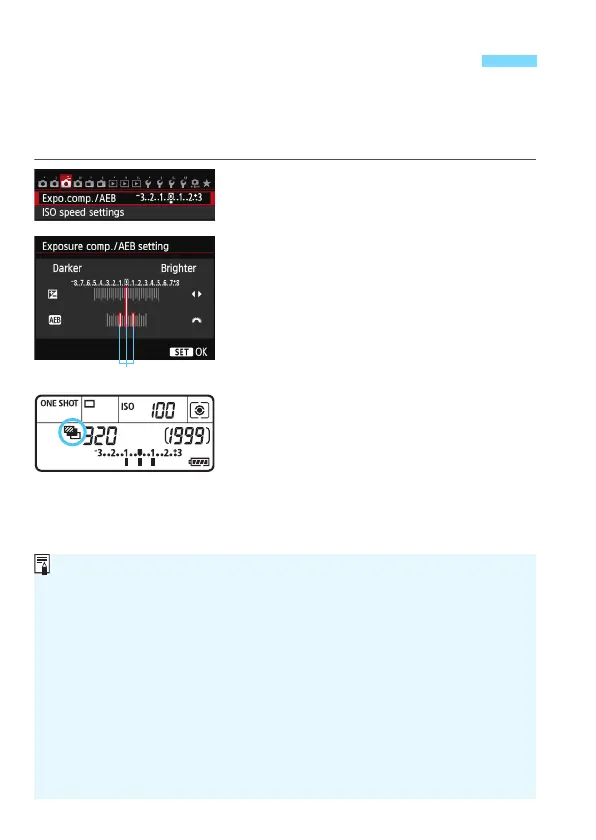
1
Select [Expo.comp./AEB].
Under the [z3] tab, select
[
Expo.comp./AEB
], then press <
0
>.
2
Set the AEB range.
Turn the <6> dial to set the AEB
range. Press the <U> key to set
the exposure compensation amount.
Pr
ess <0>
to set it.
X
When you exit the menu, <
h
> and the AEB
range will be displayed on the LCD panel.
3
Take the picture.
The three bracketed shots will be taken
according to the drive mode set in this
sequence: Standard exposure, decreased
exposure, and increased exposure.
AEB will not be automatically
canceled. To cancel AEB, follow step
2 to turn off the AEB range display.
h Auto Exposure Bracketing (AEB)N
AEB range
During AEB shooting, <
A
> in the viewfinder and <
h
> on the LCD panel will blink.
If the drive mode is set to <
u
> or <
B
>, press the shutter button three times
for each shot. When <
i
> or <
M
> is set and you hold down the shutter button
completely, the three bracketed shots will be taken continuously and the camera
will automatically stop shooting.
When <Q> or <k> is set, the three
bracketed shots will be taken continuously after a 10-sec. or 2-sec. delay.
You can set AEB in combination with exposure compensation.
If the AEB range exceeds ±3 stops, the end of the exposure level
indicator will display <I> or <J>.
AEB cannot be set for bulb exposures, or used with [Multi Shot Noise
Reduction] or flash.
AEB will be canceled automatically when you set the power switch to
<2> or when the flash is ready to fire.






 To Next Page