39
The camera is compatible with all Canon EF lenses. The camera
cannot be used with EF-S and EF-M lenses.
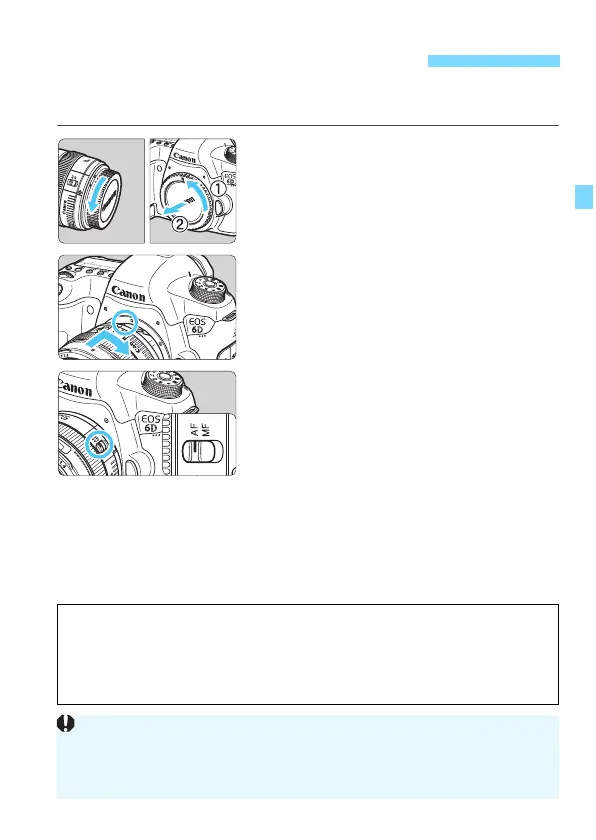
1
Remove the caps.
Remove the rear lens cap and the
body cap by turning them as shown
by the arrows.
2
Attach the lens.
Align the red dots on the lens and
camera and turn the lens as shown by
the arrow until it clicks in place.
3
Set the lens focus mode switch to
<AF>.
<AF> stands for Autofocus.
If it is set to <MF> (manual focus),
autofocus wi
ll not operate.
4
Remove the front lens cap.
Attaching and Detaching a Lens
Do not look at the sun directly through any lens. Doing so may cause
loss of vision.
If the front part (focusing ring) of the lens rotates during autofocusing, do
not touch the rotating part.
Minimizing Dust
When changing lenses, do it quickly in a place with minimal dust.
When storing the camera without a lens attached, be sure to attach the
body cap to the camera.
Remove dust on the body cap before attaching it.






 To Next Page