95
S Selecting AF PointsN
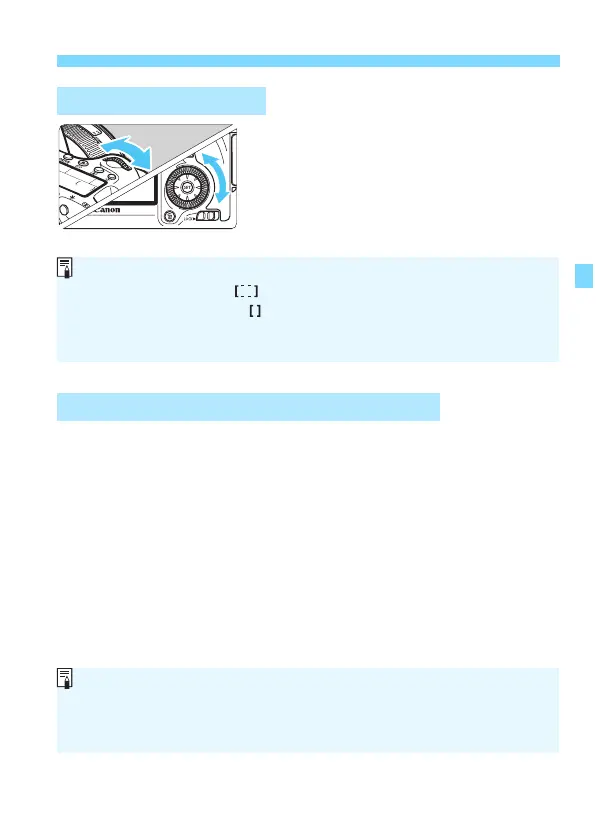
Turn the <6> dial to select an AF
point on the left or right or turn the
<5> dial to select an AF point above
or below.
If all the AF
points light up, automatic
AF point selection will be set.
Maximum lens aperture: f/3.2 - f/5.6
Cross-type focusing (vertical and
horizontal lines detected
simu
ltaneously) is possible with the center AF point. The other AF
points are either vertical- or horizontal-line sensitive.
Maximum lens aperture: f/1.0 - f/2.8
Besides cross-type focusing (vertical and horizontal lines detected
simultane
ously), the center AF point can also perform high-precision,
vertical-line sensitive AF.* The other AF points are either vertical- or
horizontal-line sensitive.
* Except with the EF 28-80mm f/2.8-4L USM, and EF 50mm f/2.5 Compact
Macro.
Selecting with the Dials
AF Operation and Maximum Lens Apertures
When you press the <S> button, the LCD panel displays the following:
•Automatic selection: AF
•Manual selection: SEL (Center)/SEL AF (Off center)
When using an EOS-dedicated external Speedlite, if focus cannot be
achieved with the AF-assist beam, select the center AF point.
If you use an Extender (sold separately) together with the lens and the
f/number becomes higher than f/5.6, AF shooting will not be possible
(except in [FlexiZoneAF
(Single)] and [u Live mode] during Live View
shooting). For details, refer to the Extender’s instruction manual.






 To Next Page