CHAPTER 6 IMAGE FORMATION SYSTEM
6-22
COPYRIGHT
©
1999 CANON INC. CANON 405/335 REV.0 JAN. 1999 PRINTED IN JAPAN (IMPRIME AU JAPON)
B. Detecting Waste Toner
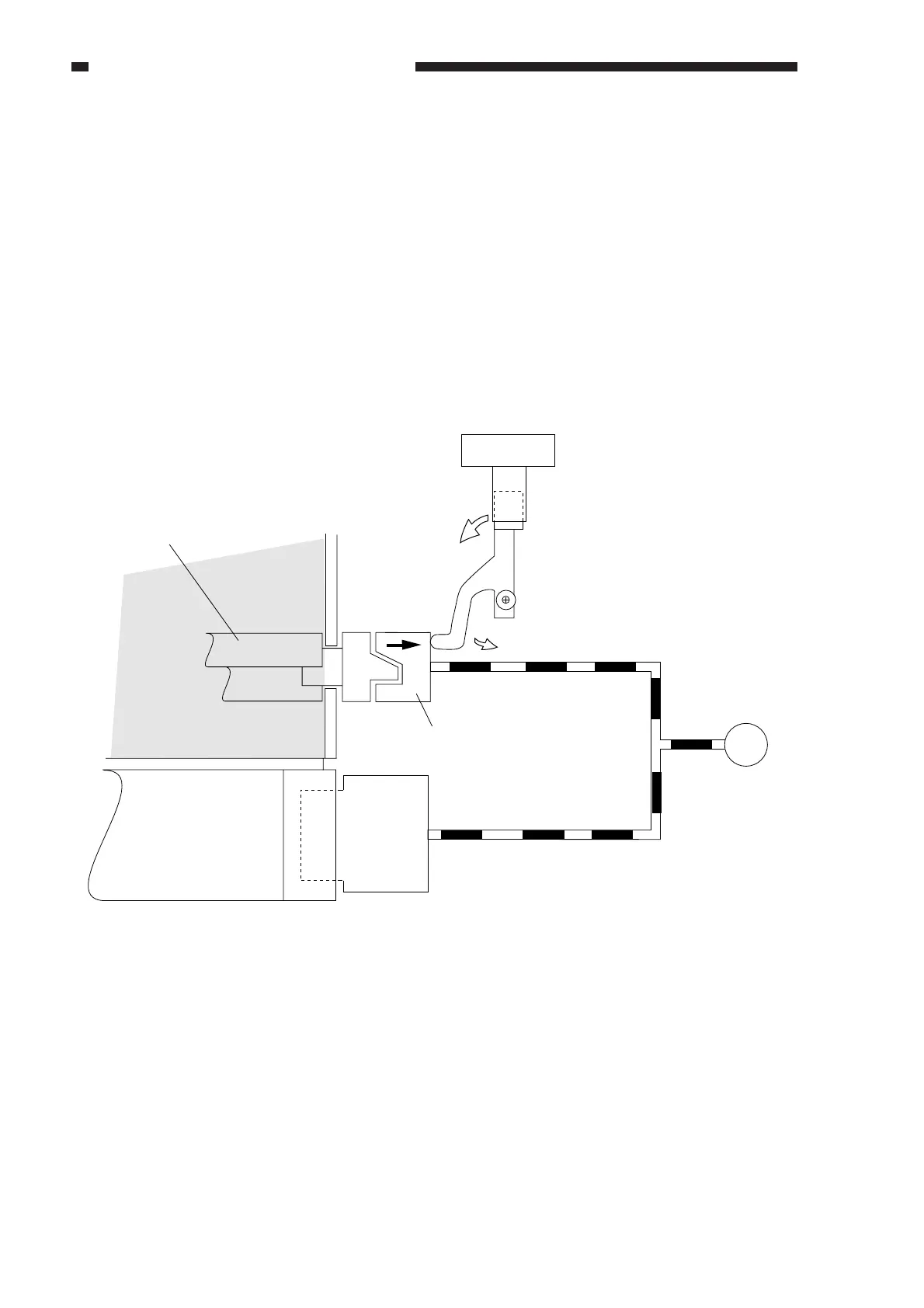
The coupling shown in Figure 6-302 is butted against the blade drive mechanism by the force
of a spring, thereby transmitting the drive of the main motor to rotate the blade.
When the cleaner case becomes full of waste toner, the rotation of the waste toner feeding blade
starts to drag, causing the coupling to move back and forth in axial direction and pushing the waste
toner sensor lever and, as a result, turning on and off the waste toner sensor (PS14) repeatedly.
The machine assumes that the waste toner case is full under the following conditions, and will
indicate the Waste Toner Case Full message while in standby state:
n The waste toner sensor turned on and off five times or more in 5 sec.
n The waste toner sensor generated the OFF signal for 1.5 sec or more.
Figure 6-302
M1
Main motor
Photosensitive drum
Waste toner feeding blade
Coupling
Cleaning case
Waste toner sensor
PS14



 To Next Page