CHAPTER 12 INSTALLATION
12-18
COPYRIGHT
©
1999 CANON INC. CANON 405/335 REV.0 JAN. 1999 PRINTED IN JAPAN (IMPRIME AU JAPON)
H. Checking the Copy images
No.
1
2
3
4
Remarks
<Optimum Image>
• In text mode, the background is free of fogging.
• In text/photo mode, step edge No. 10 is somewhat
visible, and the background is free of fogging.
• The image margins are as specified: 2.5 ±1.5 mm
Be sure to store the Service Book in the case behind the
front cover.
Work
If the machine is in service mode,
press the Reset key twice to end it.
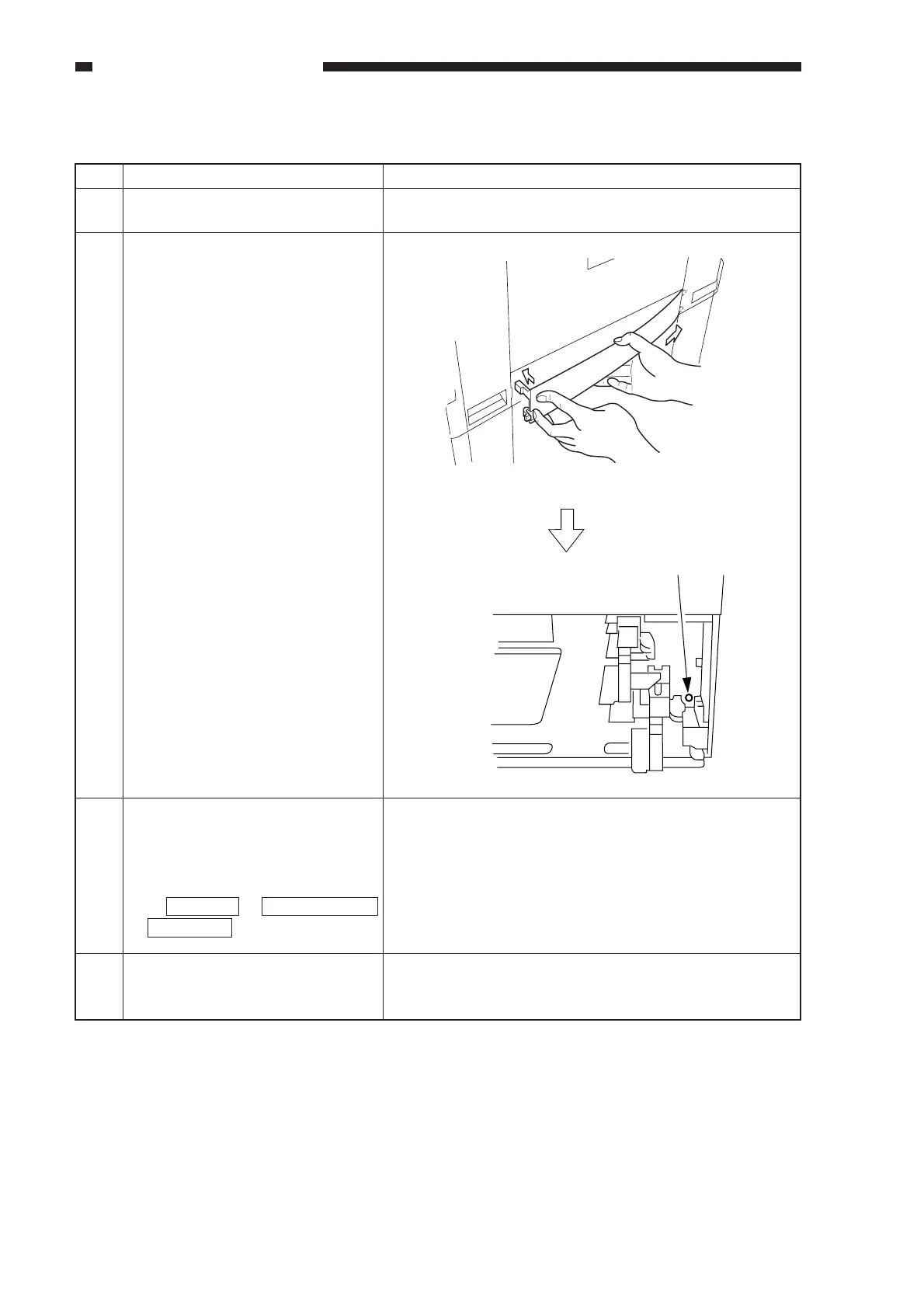
• If you are installing the
machine on a 4- or 2-cassette
pedestal, skip the following
steps.
1) Mount the lower right cover.
2) Slide out the top/bottom
cassette, and secure the lower
right cover with a screw.
Using the NA-3 Test Chart as an
original, make a copy to check
images.
Clean up the area around the
machine, and fill out the Service
Book.
[2]
[1]
Screw
To use photo mode as standard, select
(ON) user mode → common settings
→ photo mode .



 To Next Page