CHAPTER 4 IMAGE FORMATION SYSTEM
4-4
COPYRIGHT
©
1999 CANON INC. CANON 405/335 REV.0 JAN. 1999 PRINTED IN JAPAN (IMPRIME AU JAPON)
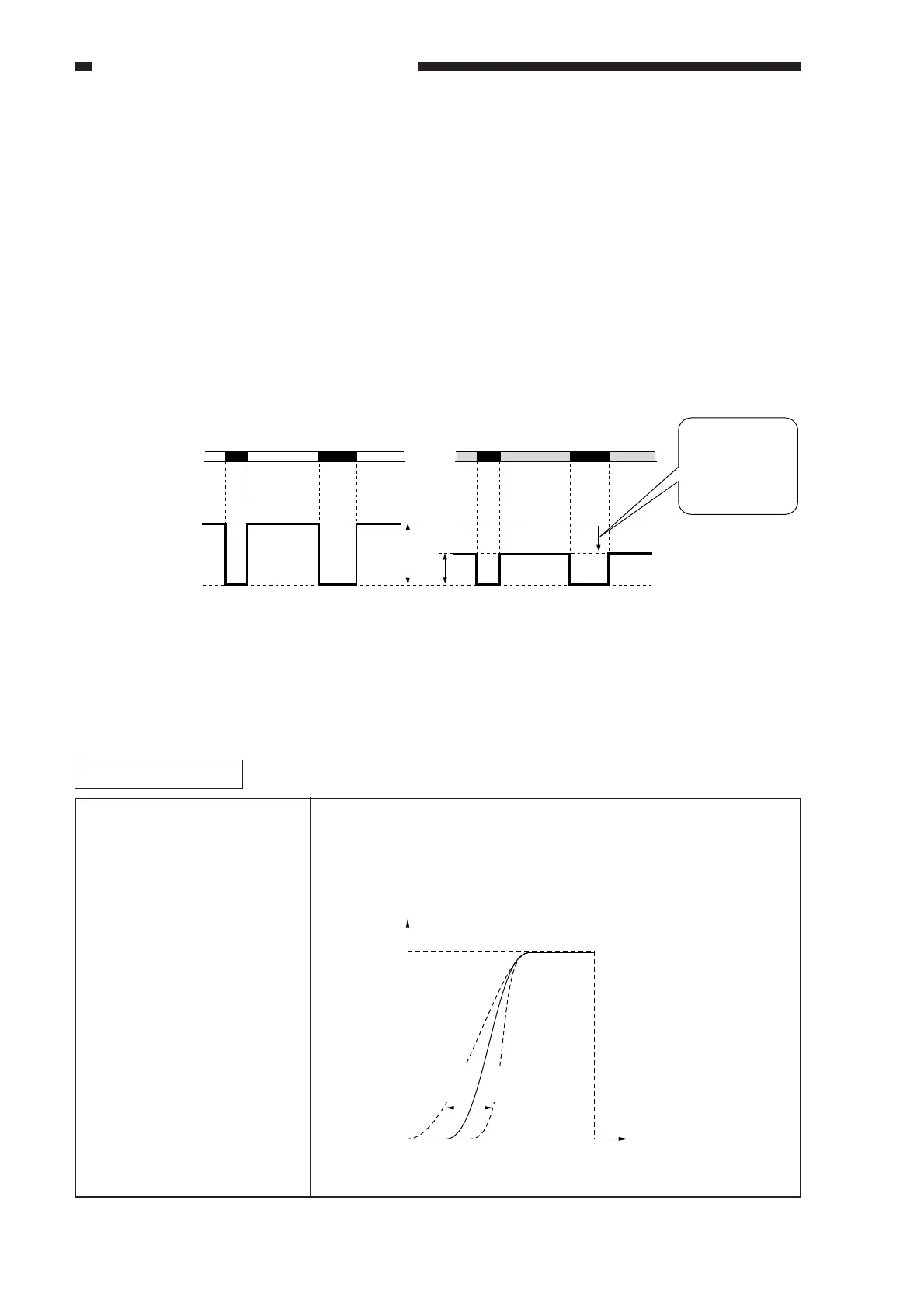
C. AE Processing (ABC processing)
The machine's AE (auto density adjustment) mechanism processes image data on a line-by-
line, real time basis (each single line in main scanning direction; it does not measure the density of
an original by pre-scanning). In the AE processing block, digital image signals (resulting from A/D
conversion) are returned to the ABC circuit of the following:
1) Based on the digital signals (1 line worth in main scanning direction) from the A/D conversion
circuit, a maximum output image signal level (background, i.e., the lightest pixel of the
original) is detected and used as Vtop.
2) Based on Vtop and Vbottom, i.e., the minimum output image signal level (the darkest pixel of
the original), a density range is determined, and a reference voltage is determined so that the
range may be expressed in 256 gradations.
3) The reference voltage is sent to the A/D conversion circuit.
Figure 4-201
Related Service Mode
ADJUST>AE>AE-TBL Use this mode to make adjustments if the density of text is tool light
on a copy made in AE mode. Adjustments will vary the density
correction curve; a lower setting will make the text darker.
FFH (white)
OOH (black)
original surface
White background original
Colored background original
: Dynamic range of a white background original.
: Dynamic range of a colored background original.
[A]
[B]
FFH (white)
OOH (black)
Output level
The ABC circuit
processes the reference
voltage to reduce the
FFH (white) level, i.e.,
decrease the dynamic
range.
[A]
[B]
Copy density
Original density
Higher
setting
Lower
setting
White
White
Black
Black



 To Next Page