COPYRIGHT
©
1999 CANON INC. CANON 405/335 REV.0 JAN. 1999 PRINTED IN JAPAN (IMPRIME AU JAPON)
8-29
CHAPTER 8 PAPER DECK
C. Drive System
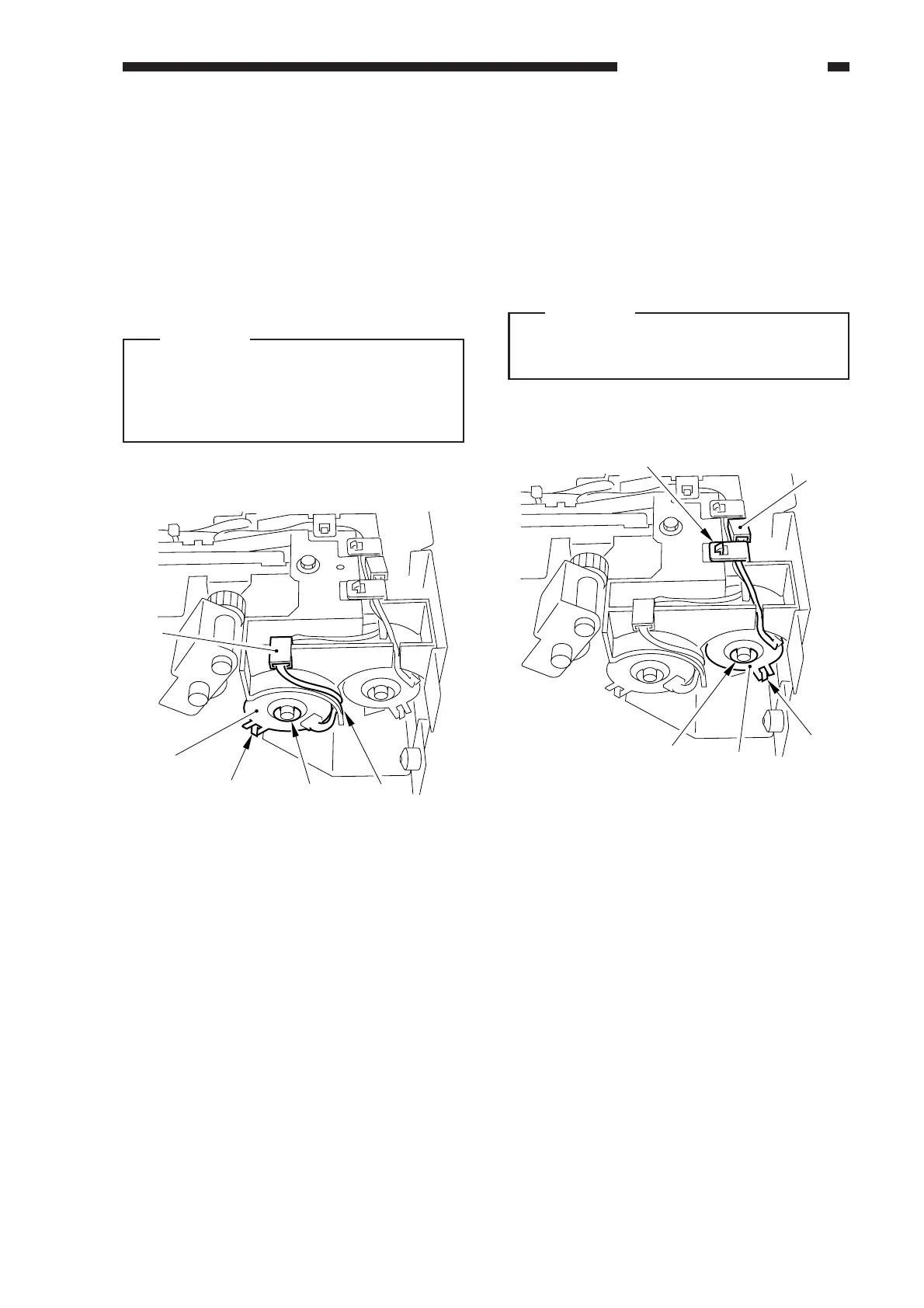
1. Removing the Deck Pick-Up Clutch
(CL102)
1) Remove the deck pick-up unit. (See p. 8-
36.)
2) Disconnect the connector [1], and remove
the E-ring [2]; then, detach the deck pick-
up clutch [3].
Caution:
When mounting the pick-up clutch, be
sure to fit the clutch in the slip stop [4].
Further, be sure to hook the harness on
the U-groove [5].
Figure 8-323
2. Removing the Deck Feeding Clutch
(CL101)
1) Remove the deck pick-up unit. (See p. 8-
36.)
2) Remove the harness retainer [1],
disconnect the connector [2], and remove
the E-ring [3]; then, detach the deck
feeding clutch [4].
Caution:
When mounting the feeding clutch, be
sure to fit the clutch in the slip stop [5].
Figure 8-324
[1]
[3]
[2]
[4]
[5]
[1]
[3]
[2]
[4]
[5]



 To Next Page