CHAPTER 14 TROUBLESHOOTING
14-142
COPYRIGHT
©
1999 CANON INC. CANON 405/335 REV.0 JAN. 1999 PRINTED IN JAPAN (IMPRIME AU JAPON)
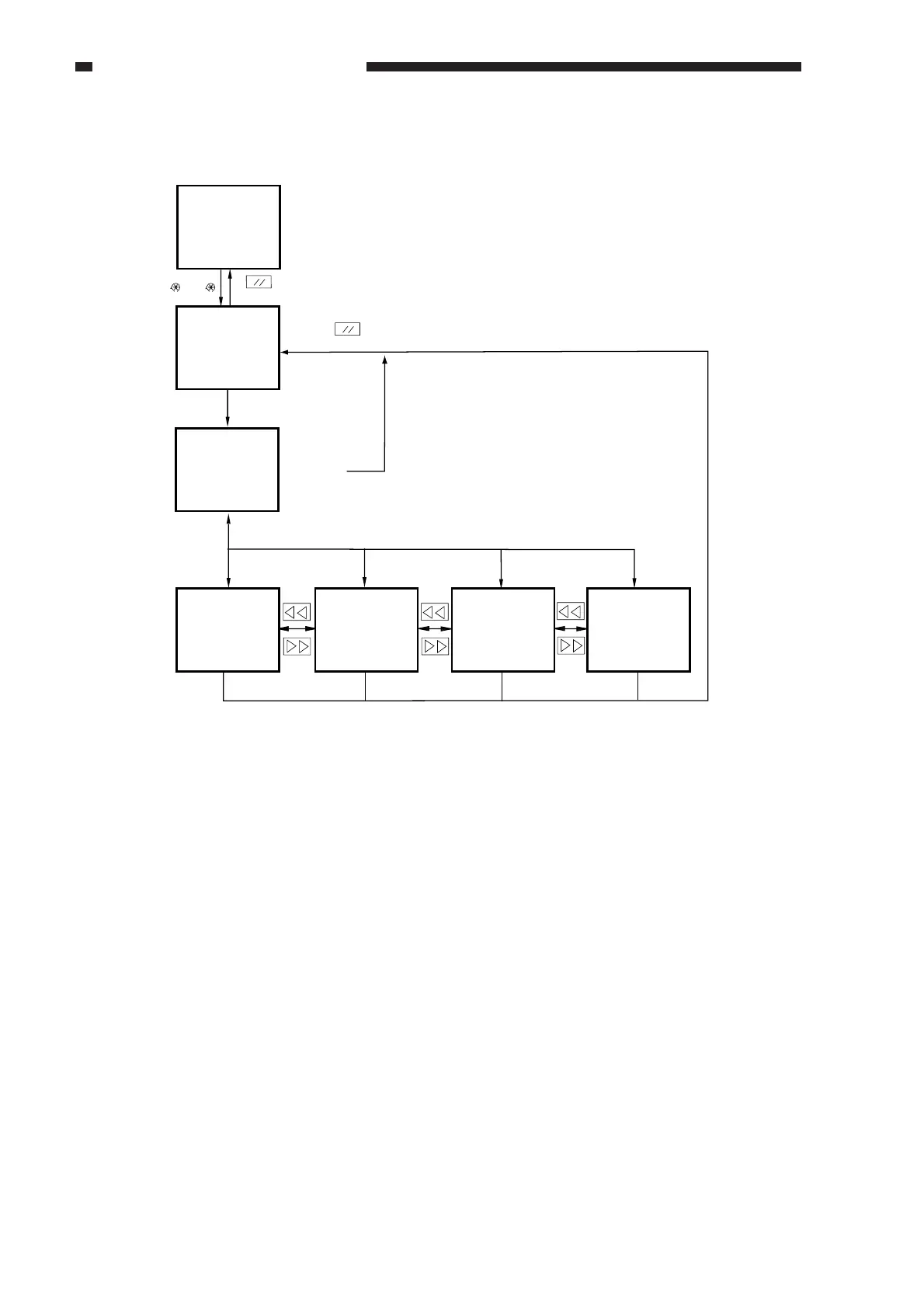
d. Selecting a Screen
Figure 14-808
e. Guide to Keys
1. Keypad
Use it to enter a numeral (0 through 9).
2. User Mode Key
Use it to start user mode.
3. Reset Key
Use it to end service mode.
4. Stop Key
Use it to stop ongoing operation.
5. Clear Key
Use it to initialize settings in service mode or software counter readings.
6. Copy Start Key
Use it to make copies without ending service mode after making adjustments.
7. Previous Page Key
Use it to return to the previous page.
8. Next Page Key
Use it to move to the next page.
9. +/- Key
USe it to switch between + and -.
10. OK Key
Use it to store an input value.
Initial screen
Level 1/2 screen
Level 3 screen Level 3 screen
Level 3 screen
User screen
From Level
1/2 screen
Reset key
To previous
/next screen
To previous
/next screen
To previous
/next screen
(
)(2,8)( )
Reset key
Select a Level 1 item at the top;
then, select a Level 2 item.
Level 3 screen
Select an item



 To Next Page