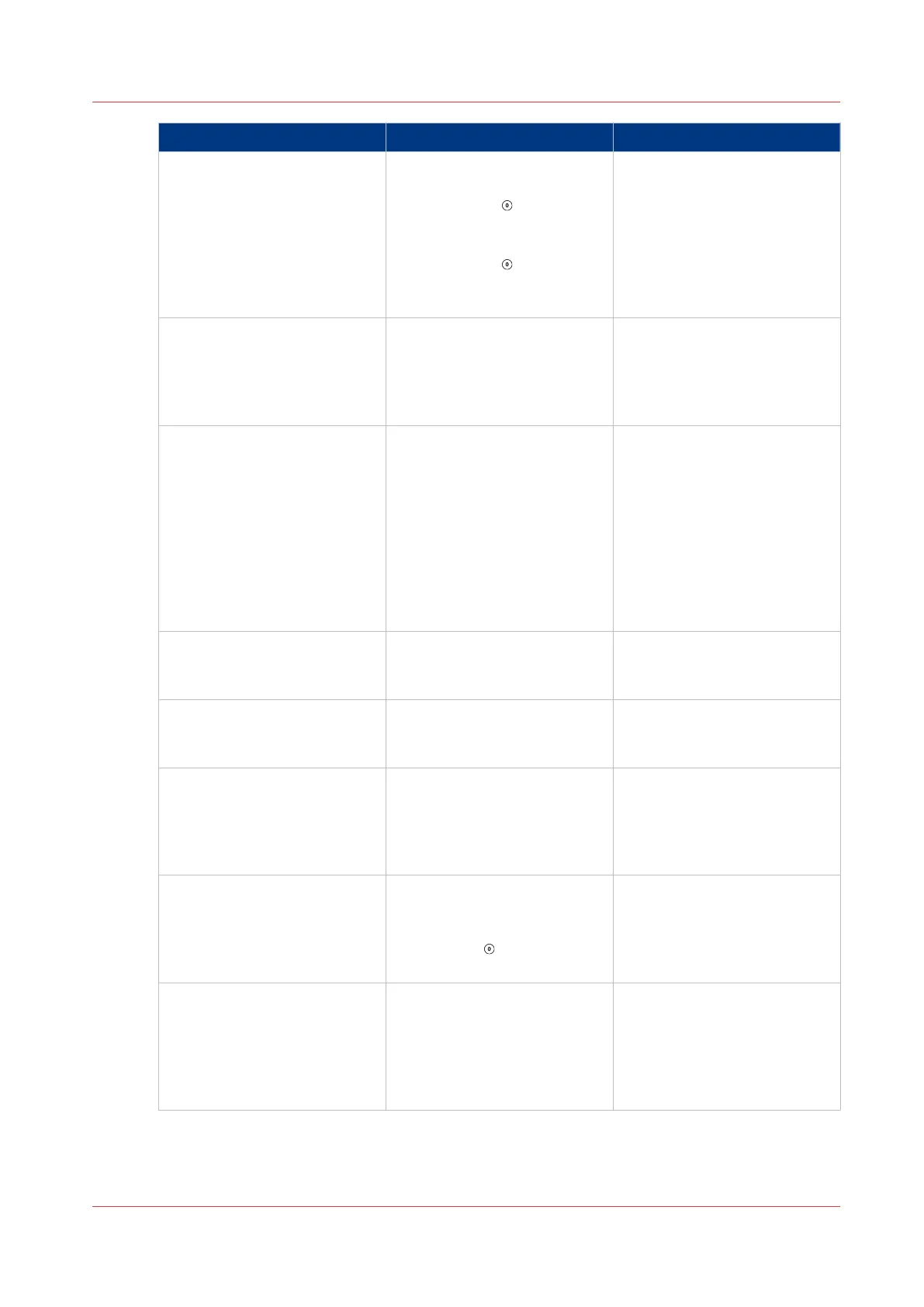
Problem Cause Solution
BRIDGE MOTOR STALL Check for a paper jam in the
connecting bridge.
• Touch STOP to stop the
Booklet maker.
• Clear the paper jam.
• Touch STOP
to clear the
message from the screen.
• Continue the print job.
See
Clear Paper Jams
on
page 85
BRIDGE - No comms Use the mains ON/OFF switch.
Turn the machine OFF, then
turn the machine ON.
If the problem continues, then
call your service engineer.
CHECK PAPER SIZE Remember to check the paper
size.
To make an accurate book you
must enter accurate paper di-
mensions into the touch
screen.
Measure the size of the prin-
ted paper. The paper dimen-
sion changes when the paper
is printed.
CHECK THE TRIM BIN The trim bin is either open or
full. Check the trim bin. Empty
the trim bin if necessary.
COVER OPEN A safety cover is open. The
machine will not operate until
the cover is closed.
DFA INTERFACE - No comms Use the mains ON/OFF switch.
Turn the machine OFF, then
turn the machine ON. If the
problem continues, then call
your service engineer.
DRIVE MOTOR STALL There is a paper jam. Check
the machine and correct the
error.
Touch STOP to clear the
message from the screen.
Endlay axis moving The endlay axis (size adjust-
ment) is moving. This mes-
sage clears when the adjust-
ment is complete.
If the message does not clear,
touch ADVANCED > RE REF.
4
Error Messages
Chapter 6 - Error Conditions, Problems and Solutions
77



 To Next Page