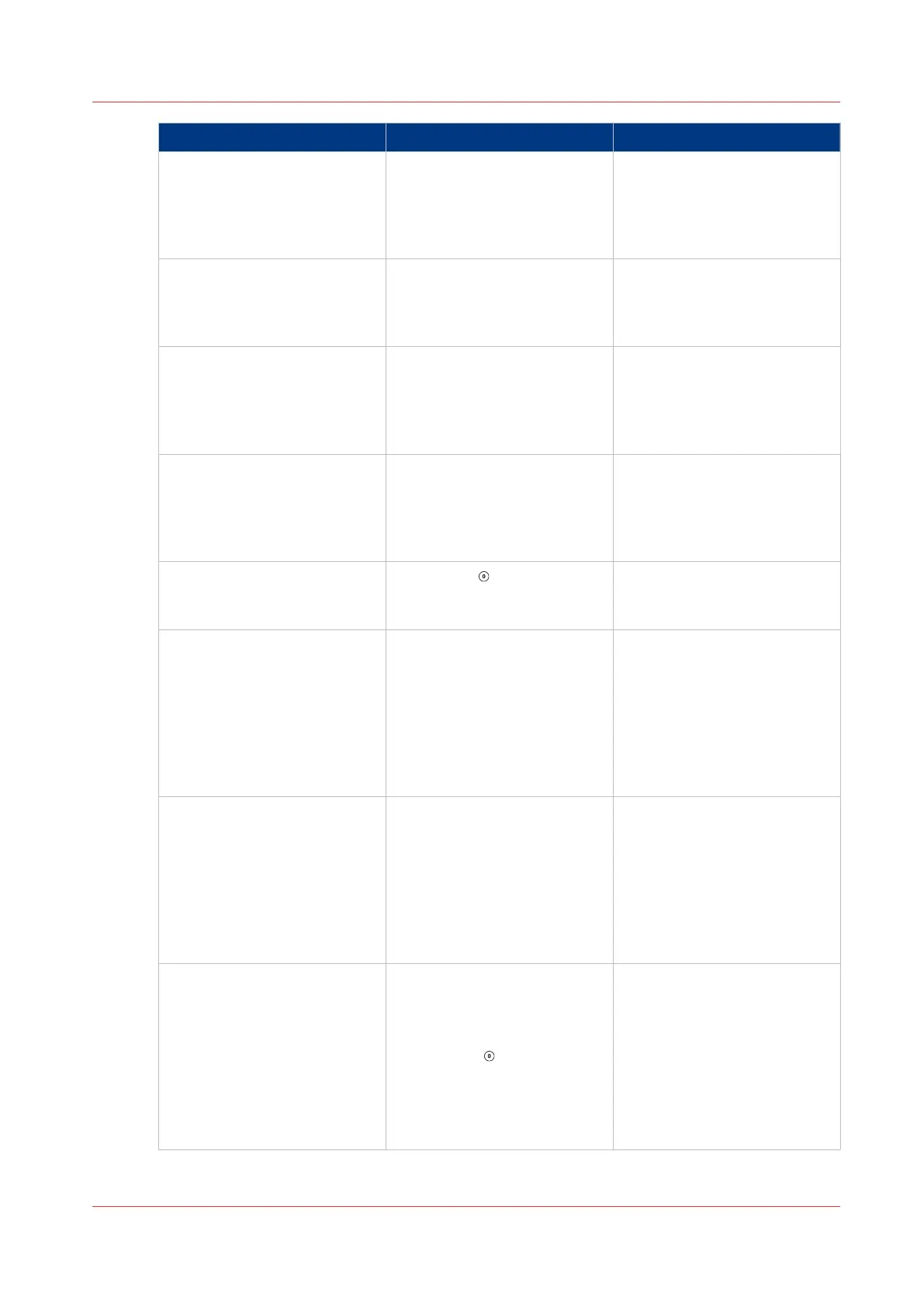
Problem Cause Solution
Stitch axis moving The stitch axis is moving. This
message clears when the ad-
justment is complete.
If the message does not clear,
touch ADVANCED > RE REF.
Stitch length will change soon The stitch length cannot adjust
at the moment. The stitch leg
length will adjust after the
next book.
STITCH - No comms Use the mains ON/OFF switch.
Turn the machine OFF, then
turn the machine ON. If the
problem continues, then call
your service engineer.
Stitch position adjusting The stitch position is adjust-
ing. This message clears when
the adjustment is complete.
If the message does not clear,
touch ADVANCED > RE REF.
STITCH TIMEOUT Press STOP . Open the folder
cover, remove the paper, close
the folder cover.
SYSTEM ERROR
00.20
40.21
40.22
Touch STOP to clear the mes-
sage from the screen. If the
message is not cleared, use
the mains ON/OFF switch.
Turn the machine OFF, then
turn the machine ON. If the
problem continues, then call
your service engineer.
SYSTEM ERROR 39.xx Press the reset button on the
stacker. If the message is not
cleared, use the stacker mains
ON/OFF switch. Turn the
stacker OFF, then turn the
stacker ON. If the problem
continues, then call your serv-
ice engineer.
TOO MANY PAGES The printer has delivered too
many sheets into the gather-
ing area. Remove the incorrect
set. Correct the printer setting.
Touch STOP
to clear the
message from the screen.
Check the settings for SET
THICKNESS or SHEET THICK‐
NESS.
See
Open the Gathering Area
Cover
on page 48
4
Error Messages
Chapter 6 - Error Conditions, Problems and Solutions
83



 To Next Page